Tutorial
Claude Code with Xisu AI (Windows / macOS / Linux)
Install Claude Code, set three environment variables for the address, key and model, and code in your terminal with Claude models on Xisu AI.
Claude Code is Anthropic's command-line coding agent: it reads your project, edits files and runs commands. Xisu AI serves the native Anthropic API, so once you point Claude Code at our address with your key, it calls Claude models through Xisu AI. No Claude account is needed.
Tested with Claude Code 2.1.300. Model names are current as of 2026-10-16.
Quick version
- Install:
npm i -g @anthropic-ai/claude-code- Set
ANTHROPIC_BASE_URL=https://api.xisu.ai,ANTHROPIC_AUTH_TOKEN=your-keyandANTHROPIC_MODEL=claude-sonnet-5-5- Open a new terminal,
cdinto your project and runclaude
You need an API key first. If you don't have one yet, follow First steps: sign up, add funds, create a key.
1. Install
Pick either method.
Option 1: npm (Windows / macOS / Linux)
You need Node.js. The Claude Code 2.1.300 package requires Node.js 22 or later. Check with node -v, and if it's older, get the LTS release from nodejs.org.
npm i -g @anthropic-ai/claude-code
If npm is slow from mainland China, you can point this one install at a domestic mirror:
npm i -g @anthropic-ai/claude-code --registry=https://registry.npmmirror.com
Option 2: the official install script (no Node.js needed)
macOS / Linux:
curl -fsSL https://claude.ai/install.sh | bash
Windows (in PowerShell):
irm https://claude.ai/install.ps1 | iex
The script downloads the program from Anthropic's servers. If that fails on your network, use option 1.
Check the install:
claude --version
Output like 2.1.300 (Claude Code) means it's installed.

2. Set the address, key and model
Claude Code reads environment variables to know where to connect and which model to use:
| Variable | Value | Notes |
|---|---|---|
ANTHROPIC_BASE_URL |
https://api.xisu.ai |
No /v1. Claude Code appends /v1/messages itself |
ANTHROPIC_AUTH_TOKEN |
your key | The same key you use for the OpenAI-compatible API |
ANTHROPIC_MODEL |
claude-sonnet-5-5 |
The main model. If unset, Claude Code defaults to Opus, which costs more |
ANTHROPIC_DEFAULT_HAIKU_MODEL |
claude-haiku-5-5 |
Recommended. Used for small background jobs such as session titles; see "Background model" below |
You can also copy the address here:
https://api.xisu.aiUse any one of the three methods below.
Windows: set them permanently in PowerShell
Open PowerShell, replace the placeholder with your key, and paste these lines:
[Environment]::SetEnvironmentVariable("ANTHROPIC_BASE_URL", "https://api.xisu.ai", "User")
[Environment]::SetEnvironmentVariable("ANTHROPIC_AUTH_TOKEN", "paste-your-key-here", "User")
[Environment]::SetEnvironmentVariable("ANTHROPIC_MODEL", "claude-sonnet-5-5", "User")
[Environment]::SetEnvironmentVariable("ANTHROPIC_DEFAULT_HAIKU_MODEL", "claude-haiku-5-5", "User")
No output means it worked. These are user environment variables, and terminals that are already open won't see them, so close PowerShell and open a new one.
macOS / Linux: add them to ~/.zshrc
macOS uses zsh by default. If you use bash, replace ~/.zshrc with ~/.bashrc. Put in your key and paste the whole block:
cat >> ~/.zshrc <<'EOF'
export ANTHROPIC_BASE_URL="https://api.xisu.ai"
export ANTHROPIC_AUTH_TOKEN="your-key"
export ANTHROPIC_MODEL="claude-sonnet-5-5"
export ANTHROPIC_DEFAULT_HAIKU_MODEL="claude-haiku-5-5"
EOF
source ~/.zshrc
In Claude Code's settings.json
If you'd rather not touch system environment variables, put them in Claude Code's own config file, ~/.claude/settings.json (on Windows, %USERPROFILE%\.claude\settings.json). Create it if it doesn't exist:
{
  "env": {
    "ANTHROPIC_BASE_URL": "https://api.xisu.ai",
    "ANTHROPIC_AUTH_TOKEN": "your-key",
    "ANTHROPIC_MODEL": "claude-sonnet-5-5",
    "ANTHROPIC_DEFAULT_HAIKU_MODEL": "claude-haiku-5-5"
  }
}
- If the file already has content, merge these entries into the existing
"env"object and mind the commas. - The key sits in this file as plain text, so don't commit it to Git or share it. A safer split is to keep only the address and model in settings.json and set the key as an environment variable.
3. Choose a model
Claude models available as of 2026-10-16:
| Use | Model | Notes |
|---|---|---|
| Everyday coding | claude-sonnet-5-5 |
A good balance of capability and price; the recommended default |
| Hard problems, large refactors | claude-opus-5-5 |
Stronger, and noticeably more expensive than Sonnet |
| Simple tasks, lowest cost | claude-haiku-5-5 |
Cheapest and fast |
| The hardest long-running work | claude-fable-5-1 |
Most capable, and the most expensive tier |
Prices are on the Models page.
There are three ways to switch:
- Change
ANTHROPIC_MODELfor all future sessions. - Pass it at launch for one session:
claude --model claude-opus-5-5. - Type
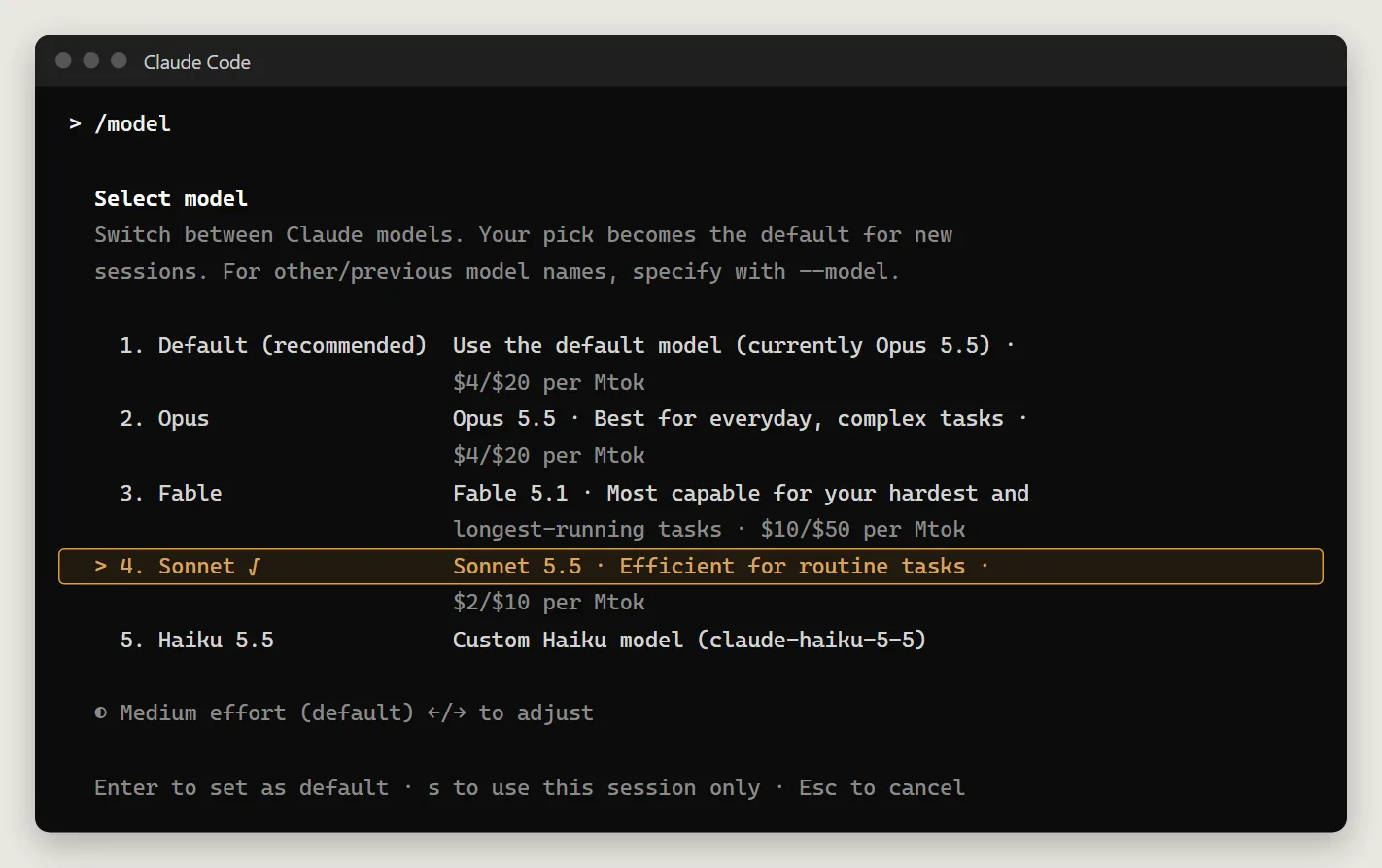
/modelinside a session. In 2.1.300 the menu entries Opus / Sonnet / Haiku / Fable map toclaude-opus-5-5,claude-sonnet-5-5,claude-haiku-5-5andclaude-fable-5-1. Press Enter to make your pick the default, or s to use it for this session only.
The per-million-token prices in the
/modelmenu are Claude Code's built-in list prices, not Xisu AI's prices. What you are charged is on the Models page and in the console's Request log.
Background model
Besides the main conversation, Claude Code sends a few background requests, for example to title a session from your first message. In 2.1.300 we observed it picks the model for these in this order:
ANTHROPIC_SMALL_FAST_MODEL(the older variable name, still honored);ANTHROPIC_DEFAULT_HAIKU_MODEL;- if neither is set, the main model.
So with Opus as your main model and nothing set for step 2, even session titles are billed at Opus rates. Set ANTHROPIC_DEFAULT_HAIKU_MODEL to claude-haiku-5-5.
ANTHROPIC_DEFAULT_SONNET_MODEL, ANTHROPIC_DEFAULT_OPUS_MODEL and ANTHROPIC_DEFAULT_FABLE_MODEL change what the aliases in the /model menu point to. The defaults are all models we currently offer, so you usually don't need them. If you do set them, use a model name that is currently available. A retired or misspelled name fails with 400 model '…' is not available when that alias is used.
4. Check the connection
Ask one question in non-interactive mode:
claude -p "Describe what you can do in one sentence"
A one-line answer after a few seconds means you're connected.

Then start interactive mode in your project:
cd your-project
claude
The first launch walks you through a few screens:
- Pick a color theme; just press Enter.
- A security notice; press Enter.
- Whether you trust this folder; use the arrow keys to choose Yes, I trust this folder and press Enter.
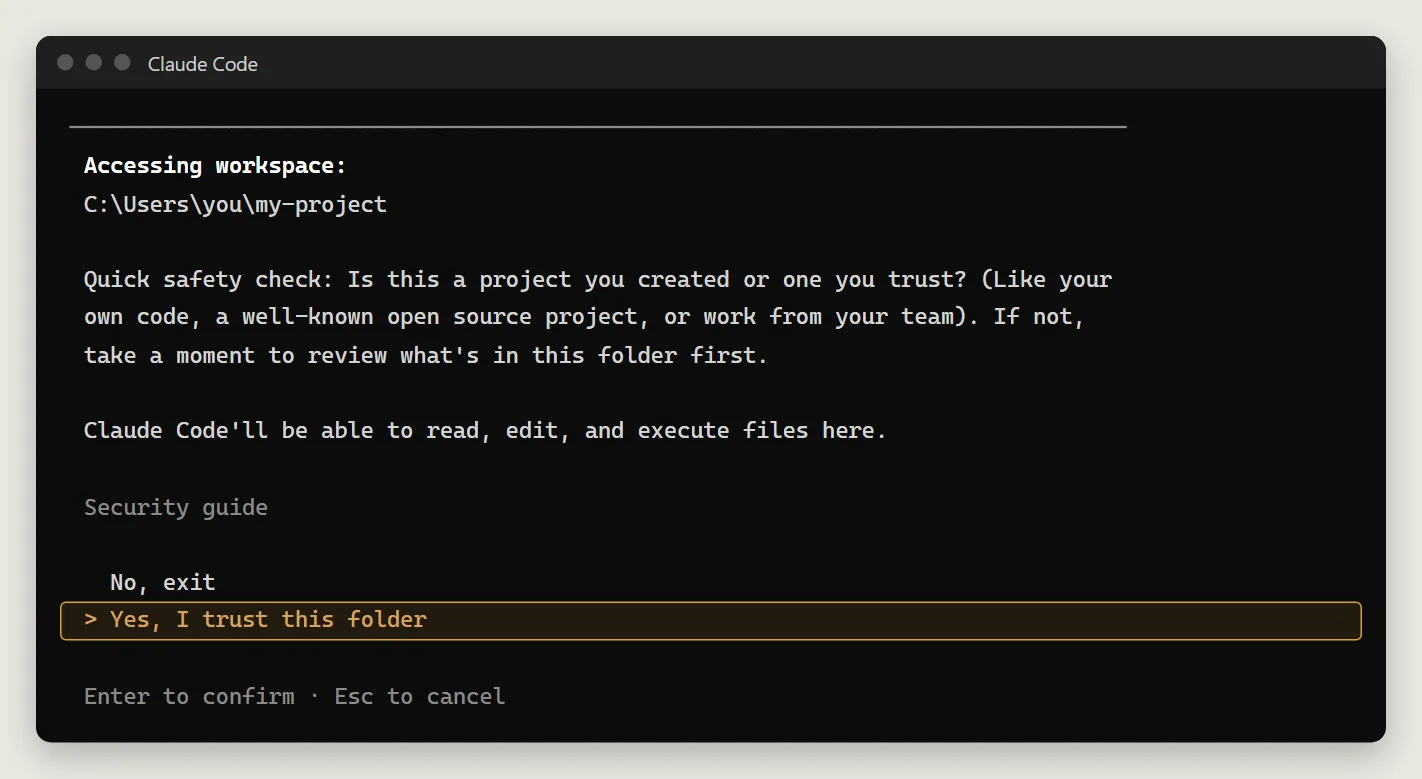
Once inside, the header shows the model and API Usage Billing. Type /status and check these three lines:
Auth token: ANTHROPIC_AUTH_TOKENAnthropic base URL: https://api.xisu.aiModel:the model you set
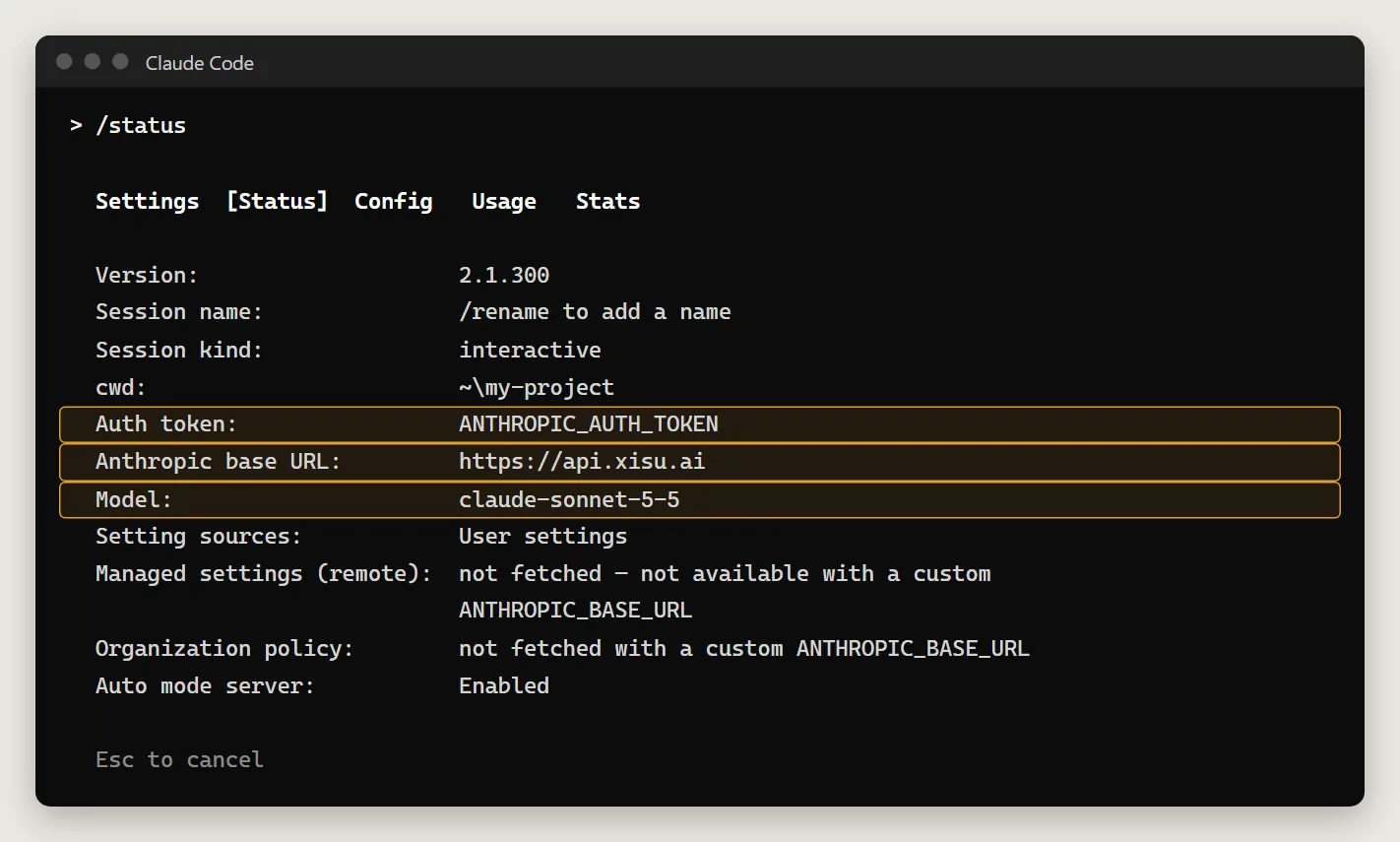
Now just describe what you want, for example "Explain what this project does". Every call shows up in the console's Request log.
5. What it costs
- Billing is per token, with input, output and cache priced separately. See the Models page. There is no monthly fee.
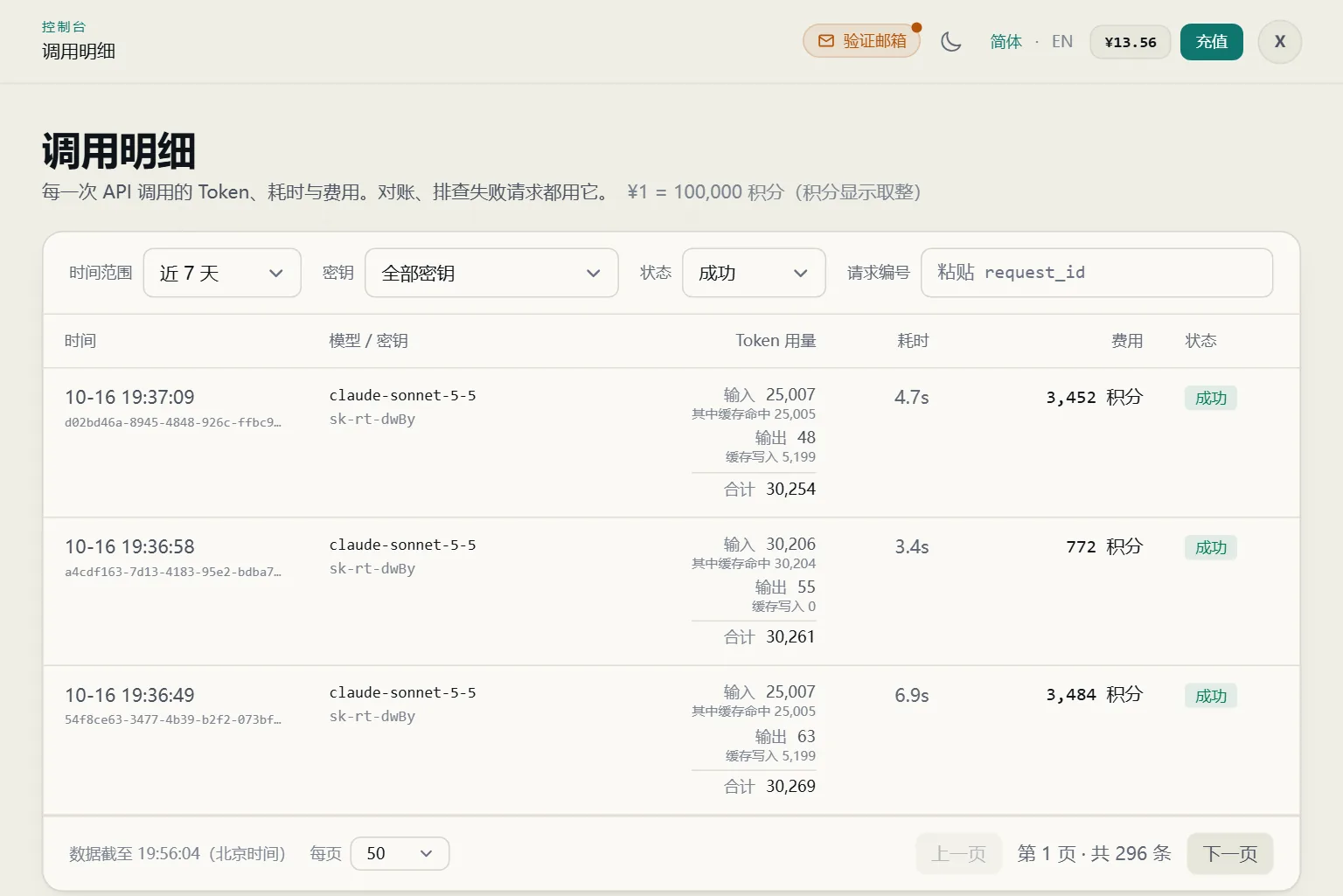
- Every Claude Code request carries a long system prompt plus tool descriptions, roughly 30,000 tokens. The first request of a session writes that block to the prompt cache and is billed as a cache write, so it costs noticeably more.
- Later requests hit the cache and are billed at the much cheaper cache-read rate. Running the same command twice in a row, the second run read about 30,000 tokens from cache and cost roughly one twenty-fifth of the first.
- The cache expires after about five minutes, so steady work costs less than one question every half hour.
- At startup you may occasionally see one or two requests return 400; the Request log shows them as failed, costing 0. Failed requests aren't billed, Claude Code retries on its own, and the result is unaffected.
- To cap spending, set a budget on the key in the console. Calls stop once it's used up.
The Request log shows input, output, cache-write and cache-read tokens and the cost of every request:
6. Limits to know about
Leave /v1 off the address. With https://api.xisu.ai/v1 the path comes out wrong and Claude Code says:
There's an issue with the selected model (claude-sonnet-5-5). It may not exist or you may not have access to it. Run --model to pick a different model.
The model name is fine; change the address to https://api.xisu.ai.
An empty balance shows up as 429. The Anthropic protocol has no "insufficient balance" error type, so an empty balance or an exhausted key budget returns 429 rate_limit_error, which looks like rate limiting. On a 429, check your balance and key budget in the console first instead of waiting and retrying.
404 and 503 call for opposite responses:
- 404
not_found_error: the model can't be used over the Anthropic API, for example becauseANTHROPIC_MODELis set to a GPT model. Retrying won't help; switch to a Claude model. - 503
overloaded_error: the model is temporarily out of capacity. Claude Code retries automatically, and it usually recovers shortly.
Server tools such as WebSearch aren't supported. Claude Code's WebSearch tool fails with:
API Error: 400 server-side tool 'web_search_20250305' is not enabled on this endpoint …
Reading and writing files, running commands and WebFetch (which fetches pages from your own machine) all work. To stop Claude Code from trying WebSearch, deny it in settings.json:
{
  "permissions": {
    "deny": ["WebSearch"]
  }
}
Protocol details are in Anthropic native endpoint, and error codes in Errors and rate limits.
Troubleshooting
No output for a long time: usually a bad key. With an invalid key Claude Code keeps retrying; in our test claude -p was still running after three minutes. Press Ctrl+C, check that the key is complete with no extra spaces, or run with --debug and look for 401 authentication_error in the log.
Environment variables don't take effect: on Windows, open a new terminal after setting user variables; on macOS / Linux, make sure you ran source ~/.zshrc. Inside Claude Code, run /status and check that Anthropic base URL is https://api.xisu.ai.
"There's an issue with the selected model": check, in order, whether the address has an extra /v1, whether the model name is misspelled, and whether it's a non-Claude model. Current model names are on the Models page.
"Can't auto-update" in /status: this is about Claude Code's own updater and has nothing to do with Xisu AI. To update, run the install command again.
Switching back to a Claude account: remove the environment variables above, or the matching env entries in settings.json, and open a new terminal.
Other clients: see Xisu AI clients: downloads and setup.