Articles
OpenAI-Compatible API Errors: Fixing 400, 401, 404, 429, and Timeouts
A practical guide to diagnosing OpenAI-compatible API errors, timeouts, streaming failures, empty model lists, tool schemas, retries, request IDs, and billing mismatches.
API errors are usually not random failures: start with the HTTP status code, then inspect the error code, message, and request_id in the response, and finally reproduce the issue with curl. This often reveals within minutes whether the cause is a key, model, request parameter, rate limit, balance, or upstream problem. Errors such as 400, 401, and 404 usually require changing the request or configuration, so retrying the same request normally does not help. Temporary errors such as 429 and 503 are the ones suitable for a limited number of backoff retries based on Retry-After.
This guide follows the sequence “symptoms → what to check first → how to fix it → how to verify the fix” and covers both OpenAI-compatible endpoints and the Anthropic native /v1/messages endpoint. For site-specific error codes and handling, refer to the error-code documentation. For general HTTP meanings, consult the official documentation from OpenAI, Anthropic, Google, xAI, and others. The exact models, quotas, and billing rules for each platform should always be confirmed from the actual response and official pages.
- This guide is for developers new to large-language-model APIs, individuals integrating third-party APIs, and users of OpenAI SDK, Claude Code, Cursor, or other tools that support custom endpoint URLs.
- Last updated: 2026-10-17
- Tested or referenced environments: site error-code, endpoint, streaming, and billing documentation; official developer documentation from OpenAI, Anthropic, Google, xAI, and Cursor; example commands for macOS, Linux, and Windows PowerShell.
30-Second Triage Table: Check the Status Code Before Deciding Whether to Retry
In plain English: the error code is the “road sign,” while the complete error response is the “exact address.” Do not rely only on the half-sentence shown by a client. Save the HTTP status, response headers, JSON response body, and request_id whenever possible.
| HTTP status | Common error code or error.type | Short explanation | What to do first | Will retrying help? |
|---|---|---|---|---|
| 400 | invalid_request_error、upstream_rejected_request、context_length_exceeded、system_not_supported_upstream | Request format, parameters, tool Schema, input length, or model capability do not match | Read message, remove unsupported fields, fix the payload, or shorten the input | Retrying the same request usually does not help |
| 401 | invalid_api_key、authentication_error | Key is invalid, not active, revoked, or the source IP is not allowlisted | Check the environment variable, Authorization or x-api-key format, and source IP | Retrying with an invalid key does not help |
| 403 | permission_error | Plan, key scope, content policy, or account status does not permit the request | Read message to determine whether the issue is model access, content policy, or account status | Not while permissions remain unchanged |
| 404 | model_not_found、not_found_error | Model name, endpoint path, or protocol does not match | Run GET /v1/models; verify the model name, capitalization, and endpoint |
Not if the model does not exist |
| 408 | Request timeout | Client or gateway did not complete the request within the permitted time | Distinguish client timeout, server timeout, and streaming idle timeout | Idempotent requests can be retried a limited number of times |
| 413 | request_too_large | Request body is too large | Split the input, compress it, or reduce multimodal content | Retrying the same request does not help |
| 429 | rate_limit_exceeded、rate_limit_error | Requests are too frequent, quota is exhausted, balance is insufficient, or the key budget has been reached | Check balance and budget first, then Retry-After and message | Backoff only when the cause is clearly rate limiting |
| 502 | upstream_error、api_error | Upstream returned an error or all upstreams failed | Try another model for comparison and save request_id | Limited retries are reasonable; report the issue if it persists |
| 503 | overloaded_error、no_available_channel | No upstream is temporarily available, or the model is cooling down or restricted | Read Retry-After, reduce concurrency, and retry later | Backoff retries usually make sense |
| 504 | api_error | Request was forcibly terminated after reaching the timeout deadline | Check client timeout, input size, and streaming settings | Limited retries are possible, but do not wait indefinitely |
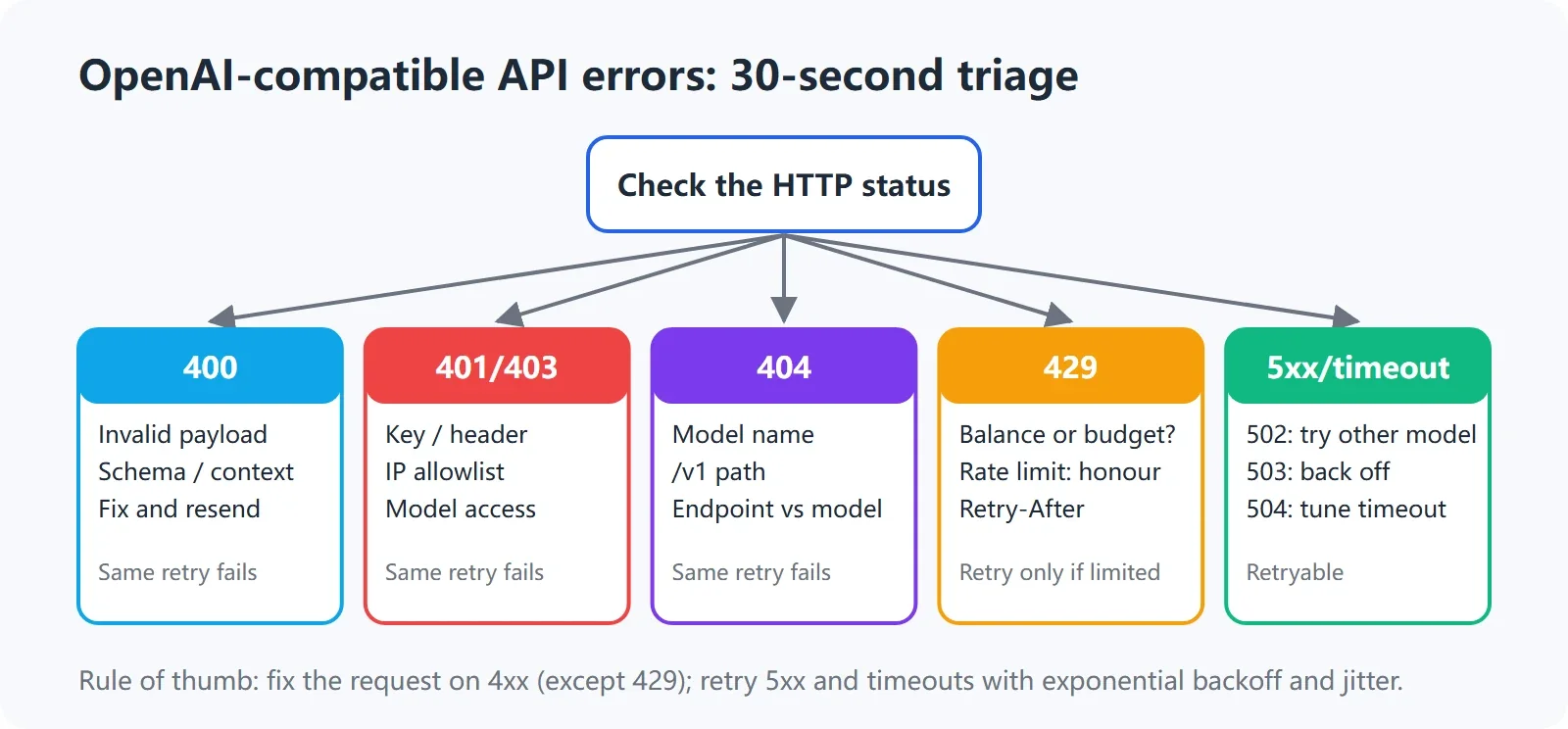
30-second triage for OpenAI-compatible API errors
Three Things to Do Before Troubleshooting
In plain English: turn “guesses” into “evidence” first. If you only keep reading the SDK’s exception string, it is easy to mix up the URL, key, model, proxy, and client cache.
- Get the complete error response. Record the HTTP status, response headers, and JSON body, especially error, message, type, code, request_id, and Retry-After. Some clients show only message by default and may hide the complete body.
- Record request_id. Preserve request_id for every response whenever possible. Console request logs can locate an individual call by request_id. Without it, support teams have to guess based on the time and model, which significantly slows diagnosis.
- Reproduce the issue with curl. Temporarily bypass the SDK, proxy wrapper, desktop client, and application code. Keep only the URL, authentication headers, model, and one short message. This shows whether the problem is with the endpoint itself or with how the client assembles the request.
The OpenAI-compatible endpoint is https://api.xisu.ai/v1. The common chat endpoint is POST /v1/chat/completions, and the model-list endpoint is GET /v1/models. See Endpoints and authentication for complete endpoint and authentication details. For initial setup, start with Get Started in 5 Minutes.
curl -i -v https://api.xisu.ai/v1/chat/completions \
  -H "Authorization: Bearer $XISU_API_KEY" \
  -H "Content-Type: application/json" \
  -d '{
    "model": "your model name",
    "messages": [{"role": "user", "content": "Reply only with OK"}],
    "max_tokens": 16
  }'
Use the command above on macOS or Linux. On Windows PowerShell, run:
curl.exe -i -v https://api.xisu.ai/v1/chat/completions `
  -H "Authorization: Bearer $env:XISU_API_KEY" `
  -H "Content-Type: application/json" `
  --data-raw '{
    "model": "your model name",
    "messages": [{"role": "user", "content": "Reply only with OK"}],
    "max_tokens": 16
  }'
-i displays response headers, while -v displays the request connection process. On success, you will normally see a 2xx status and a JSON response. On failure, do not look only at the last line. Focus on the status, error.code or Anthropic’s error.type, and the request_id and Retry-After response headers.
401 Unauthorized / invalid_api_key: Check the Key and Authentication Header First
In plain English: a 401 does not mean that the model failed to answer. It means the server did not accept the authentication for this request. Common causes include an incomplete key, leading or trailing spaces or line breaks, an environment variable that is not available in the current terminal, a missing Bearer in the Authorization header, or a revoked key.
What to Check First
- Confirm that the key is complete. Do not omit any prefix, suffix, or middle characters shown in the console, and do not copy a line break with it.
- The OpenAI-compatible interface uses
Authorization: Bearer sk-xxxx. There must be a space after Bearer. - The Anthropic native interface uses
x-api-key: sk-xxxx. Do not replace it with an Authorization-only format. Also send the version header required by the Anthropic native endpoint. - Confirm that the calling process actually received the environment variable. Open a new terminal and run the command again. In particular, an already-open PowerShell session does not automatically refresh after you set a Windows user environment variable.
- If the key has an IP allowlist, calls from outside that list may also return 401 invalid_api_key. Confirm the source IP before considering key replacement.
- Check whether the key has been revoked. If the same key returns 401 across multiple projects, check its console status first instead of retrying repeatedly.
Do not print the complete key. Print only its length or first four characters:
# macOS/Linux: print only the length and first 4 characters
python3 - <<'PY'
import os
key = os.getenv("XISU_API_KEY", "")
print("length:", len(key))
print("prefix:", key[:4] if key else "<empty>")
PY

# Windows PowerShell: print only the length and first 4 characters
$key = $env:XISU_API_KEY
if ($null -eq $key) { $key = "" }
Write-Output ("length: " + $key.Length)
Write-Output ("prefix: " + $(if ($key.Length -ge 4) { $key.Substring(0,4) } else { "<empty>" }))
If the length is 0, the current process did not receive the variable. If the first four characters are not the expected key prefix, the variable may have been overwritten by an old value. After fixing it, rerun the minimal curl command instead of immediately returning to a complex SDK.
How to Verify the Fix
From the same terminal, request the model list first. If GET /v1/models returns JSON, basic authentication and the endpoint are probably working. Then use a minimal chat request to verify the model and payload. If 401 persists, record request_id, source IP, call time, and the complete error body, then compare them with the console logs.
400 Invalid schema, upstream_rejected_request: Validate Tool Parameters Against the Schema First
In plain English: a tool call is not just arbitrary JSON inserted into a request. You must tell the model what types the tool parameters have, which fields are required, and whether additional fields are allowed. A mismatched Schema commonly produces 400 Invalid schema for function or the site-specific upstream_rejected_request.
Most Common Mistakes
The following example puts a nonexistent field in required, omits the object’s type, and does not explicitly handle additional properties in strict-validation scenarios:
{
  "type": "function",
  "function": {
    "name": "get_weather",
    "parameters": {
      "properties": {
        "city": {"type": "string"}
      },
      "required": ["location"]
    }
  }
}
When fixing it, make sure every name in required exists in properties, and explicitly declare the root object as object. If the target model or upstream requires a strict Schema, also handle additionalProperties, required fields, and strict mode according to its rules:
{
  "type": "function",
  "function": {
    "name": "get_weather",
    "description": "Query the weather for a specified city",
    "strict": true,
    "parameters": {
      "type": "object",
      "properties": {
        "city": {
          "type": "string",
          "description": "City name"
        }
      },
      "required": ["city"],
      "additionalProperties": false
    }
  }
}
Note that support for Schema subsets may differ between protocols, models, and upstreams. When converting MCP tools to function tools, pay particular attention to nested objects, array items, required, and properties. When you encounter the site-specific upstream_rejected_request, message usually includes the upstream’s original wording. Modify the payload according to that message; retrying the same request will produce the same type of error. You can also see Tool parameter schema rejected.
Two Other Common 400 Errors
context_length_exceeded: The input exceeds the context limit declared by the platform for that model. Shorten the message history, reduce tool descriptions, split long documents, or switch to a model with a larger context window. If the error includes the actual length and limit, use those two numbers as the source of truth.
system_not_supported_upstream: The current upstream for this model discards system prompts. Following the site’s recommended handling, remove system and retry, or choose a model in the model catalog without the “system unsupported” label. This is not a key issue and cannot be solved by retrying.
If content is blocked by platform policy, the site may return content_policy_violation. Retrying the same request usually does not help; modify the content instead. If a request contains pre-tokenized token arrays, images, PDFs, or other content the platform cannot read, it may return content_policy_needs_text. Send readable text instead or contact the platform to confirm the supported format.
404 model not found: Match the Model, Endpoint, and Protocol
In plain English: a 404 does not necessarily mean that the model was removed. The model name may be misspelled, capitalization may differ, the URL may have an extra or missing /v1, or a model that does not support the Anthropic protocol may have been sent to /v1/messages.
What to Check First
- Request
GET /v1/modelsdirectly and copy the model id from the response instead of typing it from memory. - Check capitalization, hyphens, version suffixes, and the complete model name. Similar-looking names are not necessarily the same id.
- For OpenAI-compatible clients, the base_url is normally
https://api.xisu.ai/v1. If the client automatically appends/v1, make sure the result does not become/v1/v1. - Claude Code’s
ANTHROPIC_BASE_URLmust not include/v1. Set it tohttps://api.xisu.ai; the client then requests/v1/messages. - Check the endpoint path. OpenAI-compatible chat usually uses
/v1/chat/completions, while Anthropic native requests use/v1/messages. - Sending a non-Claude model to
/v1/messagesmay return Anthropic’snot_found_error. The site recommends switching to a model with an Anthropic upstream or using/v1/chat/completionsinstead.
# macOS/Linux: list models and filter ids
curl -sS https://api.xisu.ai/v1/models \
  -H "Authorization: Bearer $XISU_API_KEY" | jq -r '.data[]?.id'

# Windows PowerShell: list models and filter ids
$headers = @{ Authorization = "Bearer $env:XISU_API_KEY" }
(Invoke-RestMethod -Uri "https://api.xisu.ai/v1/models" -Headers $headers).data | Select-Object -ExpandProperty id
If the command itself returns 401, return to key troubleshooting. If it returns a model array without the target model, check the key’s model scope and whether the model is currently available. If the model list works but chat returns 404, focus on endpoint concatenation and request protocol. See Endpoints and authentication for the endpoint list. Model scope and availability are determined by Models and selection and GET /v1/models.
429 Too Many Requests: Distinguish Rate Limits, Balance, and Budget
In plain English: 429 only means that the server is not accepting the request under the current conditions; it does not identify one fixed cause. In the site’s OpenAI-compatible error codes, rate_limit_exceeded means requests are arriving too quickly. However, insufficient_balance, account_overdrawn, and budget_exceeded require different handling. Under the Anthropic native protocol, insufficient balance, exhausted quota, a reached key budget, and rate limiting all use 429 rate_limit_error. You must read message and check the balance.
What to Check First
- Read Retry-After in the response headers. It is usually expressed in seconds. If the server provides it, respect that value first.
- Check whether message explicitly identifies a billing restriction, key budget, quota, or request frequency.
- Confirm the balance, key budget, and recent usage in the console. Retrying with insufficient balance is pointless. account_overdrawn means the balance is negative; the site notes that this is usually related to a clawback of a refund, so simply adding funds may not resolve the root cause.
- If requests are definitely arriving too quickly, reduce concurrency and requests per second and token volume, then use exponential backoff with jitter.
Retrying at a fixed one-second interval is problematic because multiple requests hit the limit again at the same time, creating synchronized retries. Exponential backoff gradually increases the wait, while jitter prevents large numbers of clients from waking up simultaneously. The limit can be the larger of Retry-After and your local timeout policy, but you must still set a maximum number of attempts.
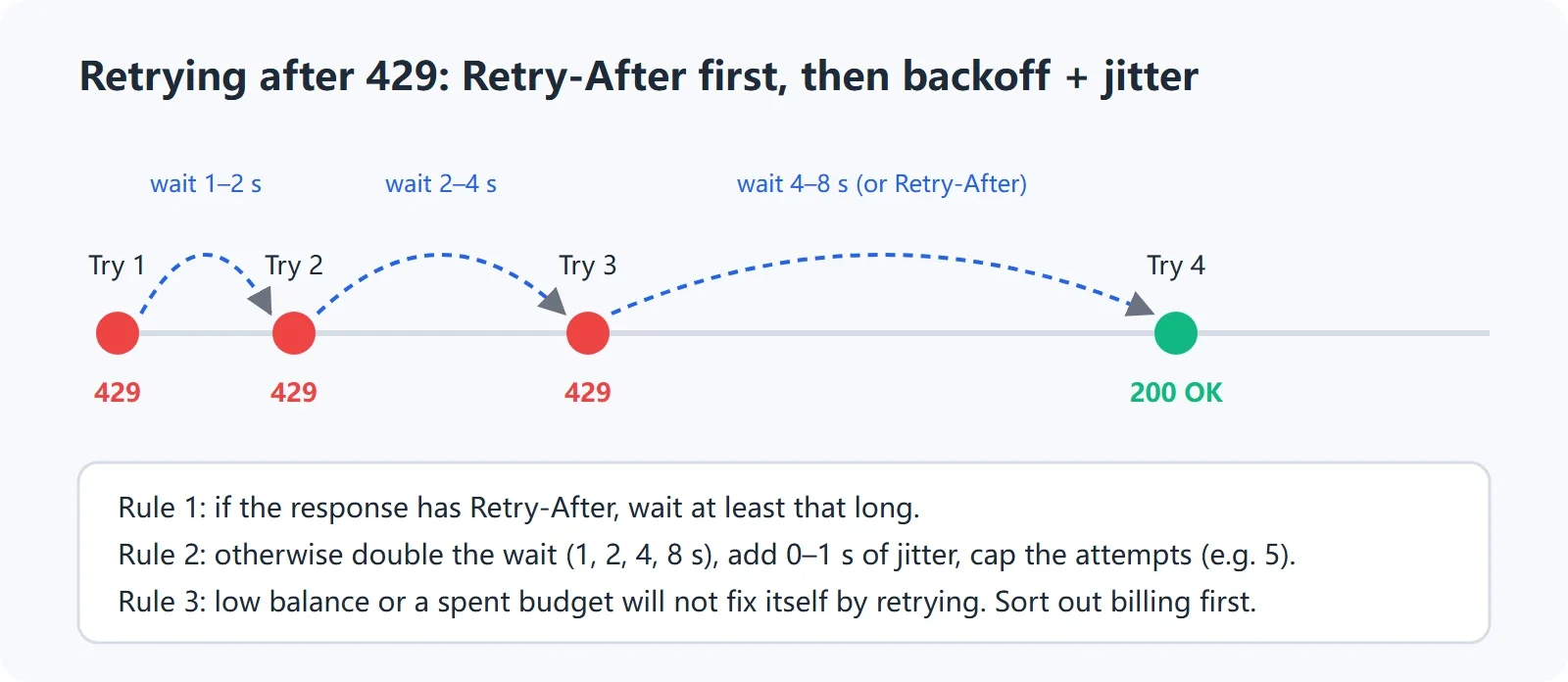
Retry timing after 429: prioritize Retry-After, then exponential backoff with jitter
import os
import random
import time
import requests

URL = "https://api.xisu.ai/v1/chat/completions"
HEADERS = {
    "Authorization": f"Bearer {os.environ['XISU_API_KEY']}",
    "Content-Type": "application/json",
}
PAYLOAD = {
    "model": "your model name",
    "messages": [{"role": "user", "content": "Reply only with OK"}],
    "max_tokens": 16,
}

for attempt in range(6):
    response = requests.post(URL, headers=HEADERS, json=PAYLOAD, timeout=60)
    if response.status_code not in (429, 502, 503, 504):
        print(response.status_code, response.text)
        response.raise_for_status()
        break

    retry_after = response.headers.get("Retry-After")
    try:
        server_wait = float(retry_after) if retry_after else 0
    except ValueError:
        server_wait = 0

    body = response.text[:500]
    if response.status_code == 429 and any(word in body.lower() for word in ["balance", "budget", "overdrawn"]):
        raise RuntimeError(f"May be a billing restriction; stopping retries: {body}")

    if attempt == 5:
        response.raise_for_status()

    exponential = min(60, 2 ** attempt)
    wait = max(server_wait, exponential) + random.uniform(0, 0.5)
    print(f"attempt={attempt + 1}, status={response.status_code}, wait={wait:.2f}s")
    time.sleep(wait)
If the output shows status=429 and the wait increases over time, the retry logic is working. If every message clearly refers to balance, budget, or billing restrictions, stop retrying and address the account status.
import OpenAI from "openai";

const client = new OpenAI({
  apiKey: process.env.XISU_API_KEY,
  baseURL: "https://api.xisu.ai/v1"
});

function sleep(ms) {
  return new Promise(resolve => setTimeout(resolve, ms));
}

async function callWithBackoff() {
  for (let attempt = 0; attempt < 6; attempt += 1) {
    try {
      return await client.chat.completions.create({
        model: "your model name",
        messages: [{ role: "user", content: "Reply only with OK" }],
        max_tokens: 16
      });
    } catch (error) {
      const status = error.status;
      const retryAfterHeader = error.headers?.get?.("retry-after") ?? error.headers?.["retry-after"];
      const retryAfter = Number(retryAfterHeader || 0);
      const retryable = [408, 429, 502, 503, 504].includes(status);
      if (!retryable || attempt === 5) throw error;
      const exponential = Math.min(60000, 1000 * (2 ** attempt));
      const wait = Math.max(exponential, retryAfter * 1000) + Math.random() * 500;
      console.error(`status=${status}, retry in ${Math.round(wait)}ms`);
      await sleep(wait);
    }
  }
}

callWithBackoff().then(result => {
  console.log(result.choices?.[0]?.message?.content ?? result);
});
The Node.js example retries only clearly temporary statuses. In production, also distinguish rate_limit_exceeded from billing restrictions using the response body. Do not retry every 429 indefinitely just because the SDK throws the same exception class.
408, 502, 503, 504, and API Timeouts: Identify Who Is Waiting
In plain English: there are three timeout layers: how long the client waits, how long the gateway allows the request to run, and how long the upstream goes without producing a deliverable result. Increasing the client timeout does not necessarily change the server’s hard deadline. Once a 504 deadline has been reached, the request is over; waiting longer cannot recover that same response.
How to Tell Them Apart
408: The request did not complete within the client or server waiting window. Check the network, input size, concurrency, and timeout settings first.
502 upstream_error: The site’s meaning is that the upstream returned an error. The cause is not necessarily in your payload. Try another model for comparison. If one model fails consistently, submit a ticket with request_id.
503 overloaded_error: Under the Anthropic native protocol, this means no upstream is currently available for the model and is considered temporary. Back off according to Retry-After. This differs from 404 not_found_error: 404 indicates a model or protocol mismatch, while 503 indicates temporary unavailability.
504: The request was forcibly terminated after reaching its deadline. You can reduce the input, lower the output limit, use streaming, or adjust the client timeout. However, if it repeatedly fails near the server deadline, simply increasing the local timeout indefinitely will not help.
OpenAI’s official error documentation recommends separating retryable errors from errors in the request itself. Google’s official troubleshooting documentation likewise recommends exponential backoff for 429 and 5xx responses and setting a maximum retry count. The actual status codes, headers, and upstream behavior remain the source of truth for the service you are using.
import os
from openai import OpenAI

client = OpenAI(
    api_key=os.environ["XISU_API_KEY"],
    base_url="https://api.xisu.ai/v1",
    timeout=60.0,
    max_retries=2,
)

response = client.chat.completions.create(
    model="your model name",
    messages=[{"role": "user", "content": "Reply only with OK"}],
    max_tokens=16,
)
print(response.choices[0].message.content)
This code sets a 60-second limit for one client request and allows the SDK to perform limited retries for the temporary errors it supports. To verify the result, check whether content is returned consistently. If 504 still occurs at roughly the same elapsed time, record request_id, duration, and model, then continue with Before Production: Timeouts, Retries, and Tool Calls.
Streaming Output Interrupted: Determine Whether It Ended Normally
In plain English: a streaming response is not one JSON document but a sequence of SSE events. Seeing some text does not mean the request ended successfully. Confirm that the final normal termination marker, finish_reason, or protocol-specific termination event was received.
How to Check OpenAI-Compatible Streaming
- OpenAI-compatible streaming responses usually end with
data: [DONE]. The final data chunk may contain finish_reason and usage. - If the connection closes directly, without
[DONE]or a normal finish_reason, treat it as an interruption. - The site’s endpoint documentation states that the final usage chunk may be unavailable if a stream disconnects midway, but already generated tokens are still billed according to actual generation. After a disconnect, start a new request; this endpoint has no resume semantics.
- Check reverse-proxy or gateway idle timeouts, whether the client reads line by line, whether it incorrectly waits for complete JSON, and whether buffering is enabled and hiding incremental output.
curl -N -i https://api.xisu.ai/v1/chat/completions \
  -H "Authorization: Bearer $XISU_API_KEY" \
  -H "Content-Type: application/json" \
  -d '{
    "model": "your model name",
    "messages": [{"role": "user", "content": "Answer in three parts: What is SSE?"}],
    "stream": true,
    "max_tokens": 128
  }'
Windows PowerShell:
curl.exe -N -i https://api.xisu.ai/v1/chat/completions `
  -H "Authorization: Bearer $env:XISU_API_KEY" `
  -H "Content-Type: application/json" `
  --data-raw '{
    "model": "your model name",
    "messages": [{"role": "user", "content": "Answer in three parts: What is SSE?"}],
    "stream": true,
    "max_tokens": 128
  }'
If the terminal continuously prints data: lines and eventually shows [DONE], the OpenAI-compatible stream probably ended normally. If only part of the response is printed before the connection closes, save the final line, status headers, and request_id.
import os
import json
import requests

url = "https://api.xisu.ai/v1/chat/completions"
headers = {
    "Authorization": f"Bearer {os.environ['XISU_API_KEY']}",
    "Content-Type": "application/json",
}
payload = {
    "model": "your model name",
    "messages": [{"role": "user", "content": "Answer in three parts: What is SSE?"}],
    "stream": True,
    "max_tokens": 128,
}

finished = False
with requests.post(url, headers=headers, json=payload, stream=True, timeout=(10, 120)) as response:
    response.raise_for_status()
    for raw in response.iter_lines(decode_unicode=True):
        if not raw or not raw.startswith("data:"):
            continue
        data = raw[5:].strip()
        if data == "[DONE]":
            finished = True
            break
        try:
            event = json.loads(data)
        except json.JSONDecodeError:
            print("Unable to parse event:", data)
            continue
        choice = (event.get("choices") or [{}])[0]
        text = (choice.get("delta") or {}).get("content")
        if text:
            print(text, end="", flush=True)
        if choice.get("finish_reason") is not None:
            print(f"\nfinish_reason={choice['finish_reason']}")

print("stream_finished:", finished)
stream_finished: True together with a finish_reason means the client received the normal termination signal. If it is False, do not treat the displayed fragment as a complete answer. Record it as an interrupted request and decide whether to start a new request.
Request Succeeded but the Bill Does Not Match: Reconcile by request_id
In plain English: the balance, call details, and your own token calculation may represent different time snapshots and may use different aggregation rules. Locate each request by request_id first, then compare input, output, cached reads, cached writes, cost, status, and the data timestamp.
- Find the individual request in the console call details by request_id.
- Compare time, model, key, input tokens, output tokens, cached reads, cached writes, duration, cost, and status.
- Do not treat “—” as 0. The site’s billing documentation says 0 means the value is actually zero, while — means the value was unavailable or could not be estimated.
- A successful request with a cost of 0 may be covered by a credit package, use a currently free model, have no output, or be classified by the system as non-billable. Failed requests may appear in the call details but are not billed.
- If the balance and usage differ, compare the “data as of” time shown on each page. A request made moments ago may not yet be included in the current snapshot.
- Include retries in your calculation. One business operation may create several API requests, so do not estimate cost from only the final successful request.
Usage for streaming requests may be returned in the final data chunk. The site’s endpoint documentation explicitly states that the final usage chunk may be unavailable after a mid-stream disconnect, while already generated tokens are still billed according to actual generation. Therefore, do not infer billed tokens directly from the number of characters the client ultimately received. See How to Reconcile Usage and Billing for more ways to reconcile individual requests, and Billing Methodology for billing rules.
Model List Is Empty or Missing Models
In plain English: the model list usually shows “what this key can see at this address,” not the complete catalog for every platform or account. If it is empty, do not immediately change the model name in the client. Confirm the endpoint response with curl first.
What to Check First
- Use GET
/v1/modelsto confirm that the response succeeds. - If it returns 401, fix the key first. The site notes that an invalid key or negative balance may also cause the model-list endpoint to fail.
- If it returns an array with only a few models, check whether the key has a model-scope restriction. The corresponding error is usually
model_not_allowed. - Check whether the client cached an old list. After changing the base_url, key, or model permissions, restart the client and manually refresh the model list.
- Check whether the base_url is wrong, especially if the client still contains the OpenAI official URL or duplicates
/v1. - If you use Claude Code, remember that its Anthropic base URL does not include
/v1; OpenAI-compatible SDKs usually require/v1.
After fixing the issue, first confirm the target model id in the command line, then enter that same id into the SDK or coding tool. Tools such as Cursor that support their own API keys also require key verification in the model settings. The official documentation states that the model appears in the model picker only after verification; the exact available models depend on the provider and the tool’s supported range.
Anthropic Native Protocol: Same HTTP Status, Different Error Types
In plain English: /v1/messages is not the OpenAI Chat Completions JSON at a different URL. It is a separate request, response, and error-type system. The site documentation lists these Anthropic native errors: invalid_request_error for 400, authentication_error for 401, permission_error for 403, not_found_error for 404, request_too_large for 413, rate_limit_error for 429, api_error for 502 or 504, and overloaded_error for 503.
Anthropic’s official error documentation also states that an error response includes a top-level error object, type, message, and request_id. During troubleshooting, do not directly apply OpenAI-compatible error names such as invalid_api_key and rate_limit_exceeded to the error.type returned by /v1/messages.
invalid_request_error: Read message and fix the payload, input length, tools, or content format. Retrying the same request usually does not help.authentication_error: Check x-api-key, key integrity, revocation status, and IP allowlist.permission_error: Read message to determine whether the issue is model scope, content policy, or account status.not_found_error: The model has no Anthropic upstream. Switch models or use the OpenAI-compatible endpoint.rate_limit_error: Check balance, quota, and key budget first. Back off only after confirming that the cause is rate limiting.overloaded_error: No upstream is temporarily available. Back off according to Retry-After.
Support Ticket Template: Make the Issue Reproducible
Before contacting support, find the request in the console logs by request_id. Do not submit a complete API Key, Cookie, Authorization header, or raw prompts containing sensitive business data. Use a redacted minimal payload instead.
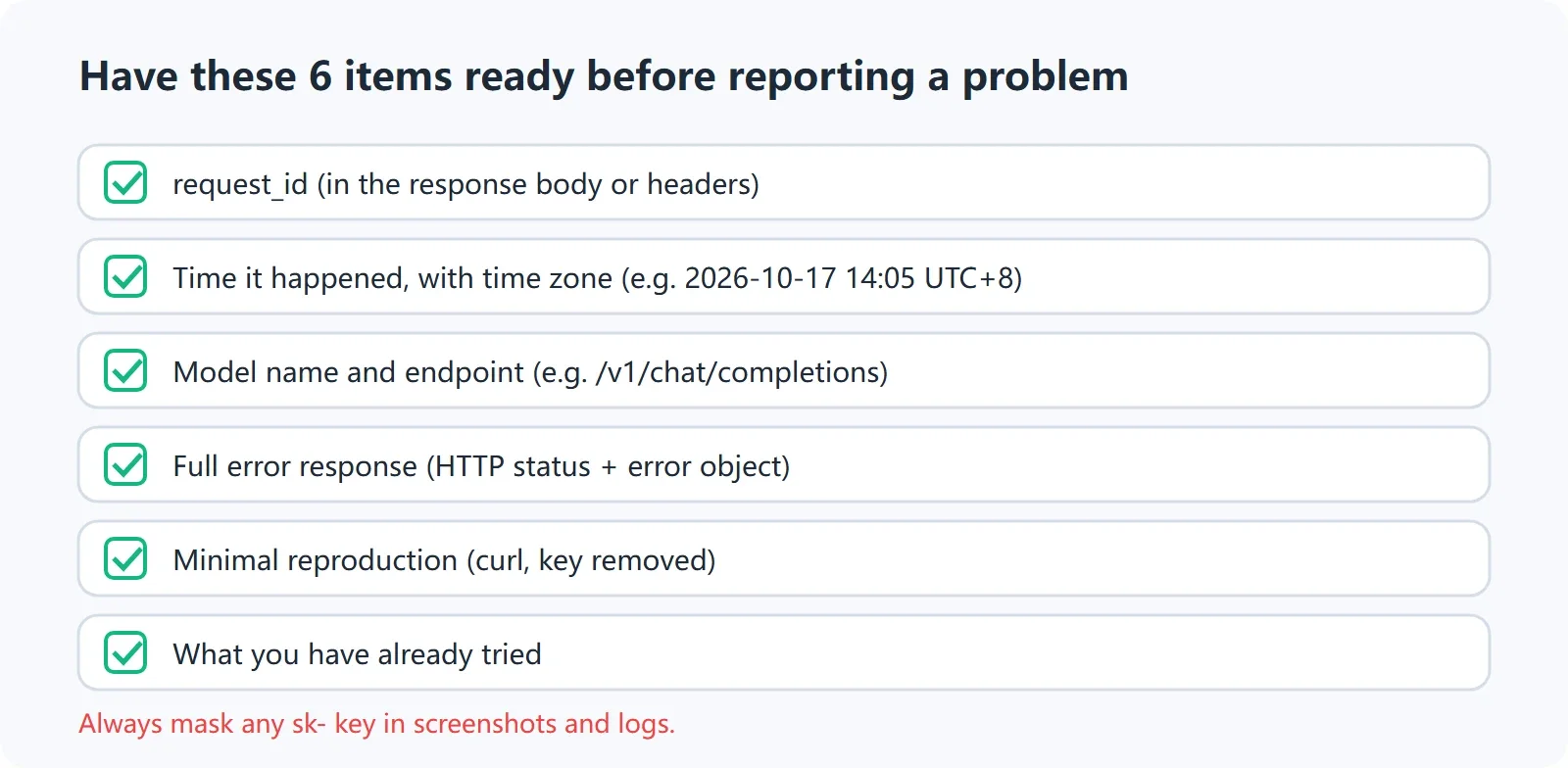
Six pieces of information to prepare before reporting an issue
Issue title: API returned [HTTP status] / [error code or error.type]

Time: 2026-10-17 14:30:00 (Beijing Time, UTC+8)
request_id: req_xxxx
Model: enter the complete model name
Endpoint: POST https://api.xisu.ai/v1/chat/completions
Protocol: OpenAI-compatible / Anthropic native

Symptoms:
For example: The request returned 429 and failed three times in a row; or the stream disconnected halfway through.

Complete error response body (key and sensitive content removed):
{
  "error": {
    "code": "rate_limit_exceeded",
    "message": "Paste the complete message here"
  }
}

Troubleshooting-related response headers:
Retry-After: enter the actual value
request_id: req_xxxx

Minimal reproduction command (key removed):
macOS/Linux:
curl -i -v https://api.xisu.ai/v1/chat/completions \
  -H "Authorization: Bearer sk-xxxx" \
  -H "Content-Type: application/json" \
  -d '{"model":"your model name","messages":[{"role":"user","content":"Reply only with OK"}]}'

Windows PowerShell:
curl.exe -i -v https://api.xisu.ai/v1/chat/completions `
  -H "Authorization: Bearer sk-xxxx" `
  -H "Content-Type: application/json" `
  --data-raw '{"model":"your model name","messages":[{"role":"user","content":"Reply only with OK"}]}'

Already tried:
1. Did you use GET /v1/models to verify the model name: yes/no
2. Did you test with another model for comparison: yes/no
3. Did you check the balance and key budget: yes/no
4. Did you wait according to Retry-After before retrying: yes/no
5. Client, SDK, and Node/Python versions: enter versions
6. Did the request pass through a reverse proxy or gateway: yes/no
A useful support report should include at least request_id, the time with timezone, model, endpoint, and complete error response body. A minimal reproduction command makes diagnosis faster. Do not write only “the API is broken” or “the billing is wrong”; descriptions like these cannot be mapped to a specific request.
A Reusable Final Troubleshooting Sequence
- Save the complete response: status code, response headers, error body, request_id, and time.
- Use a minimal curl request to confirm the base_url, authentication, and endpoint.
- Run GET
/v1/modelsto confirm that the key can see the target model. - Reduce the request to one text message and temporarily remove tools, images, long history, and complex parameters.
- Choose the action based on the status code: change configuration or payload for 400/401/403/404/413; check Retry-After and billing for 429/503; compare models and save evidence for 502/504.
- Confirm that streaming ended normally: for OpenAI-compatible interfaces, check
[DONE]and finish_reason; for Anthropic native interfaces, use the corresponding event-stream termination signal. - Only then return to the SDK, desktop client, or coding tool and restore configuration one item at a time. Change one variable per step so you can identify the cause.
If you still cannot identify the issue, look up the request by request_id in the console, then compare it with Error Codes and Rate Limits. For a new integration, return to Get Started in 5 Minutes and recheck the four basics: address, key, model, and endpoint.
Following this guide usually turns “the API does not work” into one specific configuration item, payload field, or temporary state. If the cause is still unclear, bring the request_id and minimal reproduction materials to the console for further review.
FAQ
Are 401 Unauthorized and invalid_api_key the same issue?
Not necessarily, but both should first be investigated as authentication problems. Check that the key is complete, the environment variable is active, the Authorization header uses Bearer followed by a space, the Anthropic protocol uses x-api-key, and the key has not been revoked or restricted by an IP allowlist.
Why does 429 still fail after repeated retries?
Because 429 may indicate something other than rate limiting, such as insufficient balance, a reached key budget, or exhausted quota. Read message and check the balance and budget first. Use exponential backoff with jitter and Retry-After only when the cause is clearly excessive request frequency. Billing restrictions do not disappear automatically after waiting a few seconds.
Is the API broken if the model list is empty?
Not necessarily. Use GET /v1/models to check the response status. If it is 401, fix the key first. If it returns an array without the expected model, check model_not_allowed, client caching, and base_url. If the client is still connected to the official OpenAI address, you may also see what appears to be an empty or inconsistent model list.
Why does the model still return 404 when its name looks correct?
The endpoint and protocol may not match. OpenAI-compatible requests usually use /v1/chat/completions, while Anthropic native requests use /v1/messages. Sending a non-Claude model to an Anthropic endpoint may return not_found_error. Also check capitalization, version suffixes, and whether /v1 was duplicated in the URL.
Does additionalProperties always have to be false in a tool Schema?
Not every protocol and model requires this universally, but strict Schema validation or certain upstreams may require an explicit object structure. At minimum, declare the root object’s type, ensure every required field exists in properties, and handle additionalProperties and strict according to the target model’s official tool-calling rules. When an error occurs, follow the specific field identified in message.
The stream stopped halfway through. Does the generated content count as a successful request?
Do not judge this only by whether the client displayed some text. OpenAI-compatible streams normally require the final [DONE] and finish_reason. Without a normal termination signal, treat the request as interrupted. The site’s endpoint documentation states that the final usage chunk may be unavailable after a mid-stream disconnect, but already generated tokens are still billed according to actual generation. Start a new request after a disconnect; this endpoint has no resume semantics.
Will setting the client timeout to 10 minutes solve a 504?
Not necessarily. The client timeout only determines how long the client is willing to wait. The server or gateway may still have a hard deadline. Reduce the input, lower the output size, use streaming, and check whether the model fails at the same point every time. If 504 continues, save request_id and duration for further investigation.
If a request fails but appears in billing records, was I charged twice?
Failed requests may appear in call details, but the site’s billing documentation states that failed requests are not billed. A successful request with a cost of 0 may also reflect a credit package, no output, a currently free model, or a system classification of non-billable. Reconcile each request by request_id, status, cost explanation, and data timestamp.
Can I include the complete API Key in a support report?
No. Use sk-xxxx, the environment variable name, or only the first four redacted characters. Remove Authorization, Cookie, and keys from complete requests. If a complete key appears in logs, screenshots, chat records, or tickets, treat it as exposed and replace it promptly.
References
- Error Codes and Rate Limits
- Endpoints and Authentication
- Tool Parameter Schema Rejected
- Before Production: Timeouts, Retries, and Tool Calls
- How to Reconcile Usage and Billing
- Billing Methodology
- OpenAI API Error codes
- Anthropic Claude API errors
- Google Gemini API Troubleshooting guide
- Google Gemini API errors
- xAI Debugging Errors
- xAI Rate Limits
- Cursor API Keys
The examples in this guide are for troubleshooting and development testing only. Actual model availability, protocol capabilities, error responses, and billing results are determined by the official or platform pages available at the time of the call.