Account & Security
Data security and API key security at Xisu AI
Xisu AI data and key security: request and reply content is not stored by default, call records are kept 40 days, nothing is used for training or sold; keys are shown once, with IP allowlists, model scope, budgets, rotation, revocation and a pre-launch checklist.
The short version:
- We do not store the content of requests or replies by default. Call records hold only the time, model, token counts, cost, request_id, status and source IP. They are kept for 40 days, after which only daily totals remain.
- Your data is never used to train models, never sold or rented, and never used for advertising.
- A key is shown in full only once; the server keeps only a hash that cannot be reversed.
- Each key can have its own IP allowlist, model scope and budget. Rotation has a grace period; revocation is immediate.
The Privacy Policy is the authoritative text. This page explains the parts that matter most when you integrate.
Your data: what we store and for how long
Request and reply content
Not stored by default. Your request has to be forwarded to the upstream model provider to get a reply, which is passed back to you unchanged; that leg is handled by the upstream provider under its own data policy.
Content safety checks
To block illegal content, request text goes through automated content safety checks, part of which is done by a third-party moderation API. The check returns only "pass" or "block". We record which rule (and keyword) was matched and do not store the request text.
Content sampling: only with your agreement
Only when you ask us in a ticket to investigate a specific problem, and agree to it, do we temporarily turn on content sampling for the key concerned:
- it runs for at most 24 hours;
- sampled content is stored encrypted and deleted automatically after 3 days;
- every activation and every view is recorded in an audit log.
Without your agreement in a ticket, it is not turned on.
Call records and other records
A call record holds: time, model, input and output token counts, cost, request_id, result status and source IP. These are the basis for billing, reconciliation and troubleshooting, and do not include the content of requests or replies. You can view your own records call by call under Request log in the console.
| Information | Kept for |
|---|---|
| Per-call details | 40 days, after which only daily totals of usage and cost remain |
| Sign-in records (time, IP, browser identifier) | 30 days |
| Tickets and attachments | Deleted automatically 30 days after the last reply |
| Temporary content sampling (only with your agreement) | 3 days |
| Account details | While the account exists; deleted when you close it |
| Orders and payment records | Kept as needed for reconciliation, refunds and fraud prevention, and used for nothing else |
What this information is used for, and who receives it
Only to run the service, bill and reconcile, troubleshoot, detect abuse and fraud, and answer your tickets. It is never used to train models, never sold or rented to third parties, and never used for advertising.
The only recipients are: upstream model providers (the request content needed to complete the request), payment providers (the order details needed to complete a payment), network and security providers (the site is served through a CDN for speed and protection, so requests pass through its network), and anyone entitled under valid legal process.
In transit and at rest
The whole site is served over HTTPS; passwords and API keys are stored only as hashes; sensitive data such as content samples is encrypted at rest; back-office access requires two-factor authentication and is audit-logged.
API keys: keeping them safe
The key is shown once
When you create or rotate a key, the page shows it in full once, with the notice "This key is shown only once — save it now". Once that is closed, we cannot recover it either: the server stores only a hash, and support cannot see the original. After that the key card shows only a prefix (like sk-rt-xxxx…) so you can tell keys apart.
If you lose it:
- if you are sure it has not leaked and you simply didn't save it, rotate to a new one; the old key keeps working through the grace period so your services can move across smoothly;
- if it might have leaked, revoke it straight away and create a new one.
Don't open a ticket asking for the original; we can't provide it.
Keep the plaintext out of your code
Keep the key in an environment variable or your secrets manager, and have the code read only the variable:
import os
from openai import OpenAI

client = OpenAI(
    base_url="https://api.xisu.ai/v1",
    api_key=os.environ["XISU_API_KEY"],  # read from the environment; no plaintext in code
)
print(client.models.list().data[0].id)
To set the variable: $env:XISU_API_KEY="your key" in PowerShell, export XISU_API_KEY="your key" on macOS / Linux. If the variable is missing, this code fails with a KeyError instead of quietly sending a request with an empty key.
Where a key must never appear
- Front-end code, browser extensions, mobile app bundles (all can be decompiled or simply read);
- public repositories, CI logs, screenshots or screen recordings of errors;
- the body of a ticket you send us (see "What must not go into a ticket" below).
Three gates on every key
Under API keys in the console, each key card shows its name, prefix, last use, remaining / used amount (in points) and status, plus the buttons Rename, Edit budget, IP allowlist, Model scope, Rotate and Revoke. Each gate is configured per key, independently of the others.

| Setting | What it does | What you get when it blocks you |
|---|---|---|
| IP allowlist | Only requests from the listed addresses may use this key | 401 invalid_api_key |
| Model scope | This key may call only the selected models | 403 model_not_allowed |
| Budget | The most this key may spend in total | 429 budget_exceeded |
IP allowlist
One entry per line: a single IP (such as 203.0.113.7) or a range (such as 203.0.113.0/24); IPv6 works too. Enter the caller's public egress address, not an internal one; requests whose source IP cannot be determined are also refused. Saving an empty list removes the allowlist, so any source may use the key.
⚠️ Being blocked by the IP allowlist returns exactly the same error as an invalid key, and your source IP is not echoed back. That is deliberate: a dedicated error would tell whoever found the key "the key is fine, just try another network". So if every call suddenly fails with "invalid key" while the key itself is fine, check the allowlist first; recreating the key again and again won't help.
Model scope
With nothing selected, the scope is No limit: the key can call every model your account can use. Once you select models, only those can be called with this key, and the others show as "Not included for this key" on the Available models page.
Model scope intersects with what your plan allows. When blocked, read the wording of the error message: "…by your plan" means the plan doesn't cover the model; "…for this API key" means the plan does, but this key's scope leaves it out. In that case edit the model scope; upgrading the plan won't help.
Once you select a fixed list, models the platform adds later are not automatically available to this key. Come back and add them if you need them.
Budget
Set it when you create the key or later with Edit budget. You enter it in CNY; the card shows it in points. Key points:
- the budget is cumulative; it does not reset monthly;
- amounts covered by credit packs count towards it;
- once it is used up the key stops working (
429 budget_exceeded) and does not recover on its own; other keys are unaffected; - to restore it, raise the cap with Edit budget, or use Reset spent to set the spent amount back to zero (the cap stays the same and the key works again at once);
- setting the cap below what has already been spent stops the key as soon as you save.
Rotation and revocation
Rotation
Rotate creates a new key that inherits the plan, budget, IP allowlist, model scope and expiry. The old key stops working after the grace period you choose: 1 hour, 24 hours (recommended, the default), 3 days, 7 days, or "expire immediately". During the grace period both keys work, so you can move your services across one at a time.
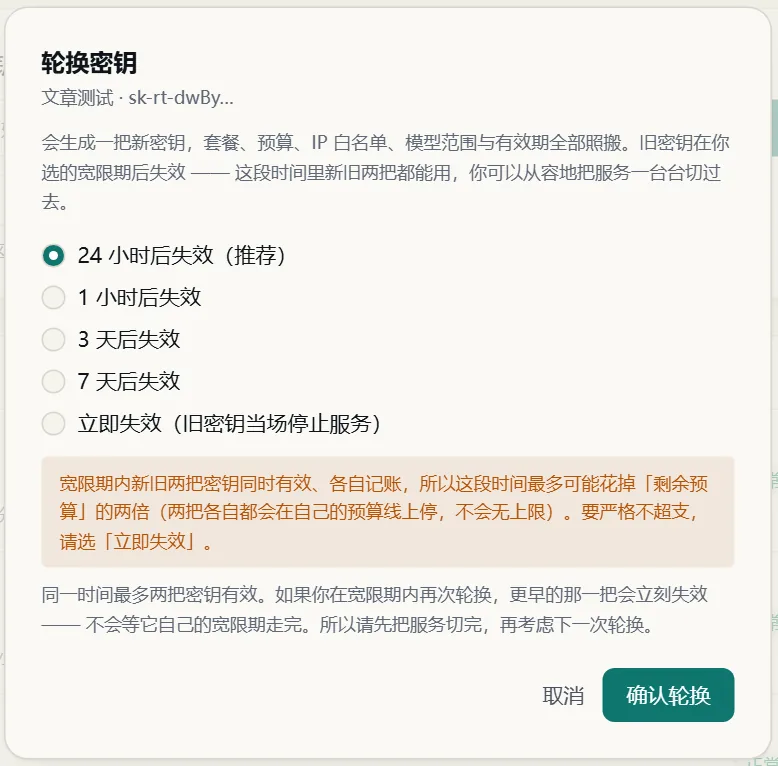
- At most two keys are valid at once. If you rotate again during a grace period, the older key is revoked immediately; it does not get to finish its own grace period. Finish moving your services before rotating again.
- Both keys bill separately during the grace period. Up to twice the remaining budget can be spent in that window (each key still stops at its own budget). For a strict cap, choose "expire immediately".
- If a rotation fails, refresh the list first. The server may have succeeded even though the response was lost; clicking again could leave you with an extra key whose plaintext nobody has seen.
Revocation
Revocation takes effect immediately, with no grace period: every service using the key starts getting 401 at once, and it cannot be undone. Revoked keys can be removed from the list; their past request logs and invoices stay attributed to them and remain available.
If you suspect a leak
- Revoke the key immediately (or rotate with "expire immediately");
- filter the Request log by that key and look for calls you don't recognise;
- give the new key an IP allowlist and a budget before putting it back into service.
What must not go into a ticket
Tickets are kept until 30 days after the last reply, and support never needs any of these to investigate:
- a key in plaintext (even a revoked one);
- your account password;
- two-factor authentication codes;
- full conversations containing personal information.
To investigate a call we need only four things:
| What | Where to find it |
|---|---|
request_id |
The x-request-id response header, or the string under the time in the console's Request log (one click selects all of it) |
| When it happened | The time in the Request log, with the time zone |
| Model | The model you sent |
| The full error response body | The raw error JSON your program received, pasted as text rather than a screenshot |
If we really do need to see request content to pin a problem down, we will explain why in the ticket and ask for your agreement, then turn on temporary content sampling for that key under the rules above. You never need to paste conversations in. If you paste a key into a ticket by mistake, revoke it right away.
Pre-launch security checklist
- One key per service (or per environment), named for its purpose, such as "prod-support-bot", so an incident touches only that key.
- Keys live only in environment variables or a secrets manager, never in repositories, front-end code, app bundles, logs or screenshots.
- If your servers have fixed egress IPs, set an IP allowlist with the public egress addresses.
- Select only the models you actually use in the model scope.
- Set a budget, and decide who handles it when it runs out (raise the cap or reset spent).
- Rehearse a rotation before launch (with a 24-hour grace period) and confirm your services can switch to the new key.
- Know where Revoke is, and the three steps to take after a leak.
- Application logs record the
request_idonly, never the Authorization / x-api-key header. - Turn on two-factor authentication for your account.
- Revoke old keys you no longer use.
Related: Reconciling usage and bills, Error codes and rate limits, Privacy Policy.