Articles
How to Check a Low-Cost API Relay's Bill and Token Usage
How to test for inflated rates and inflated usage: read all four prices, run three fixed request groups, match each request_id against the bill and check the balance change. Includes scripts and our own results on Xisu AI.
First, a note: a low price does not mean a relay is unreliable. Price gaps can come from official discounts, caching, bulk purchasing or supplier strategy. This article does not rate any provider. It gives checks you can reproduce, and the verdict should rest on API responses, billing records, privacy policies and stability data. That applies to us too.
You can't tell whether a bill is right by feel. You have to check it call by call. This article does it in two steps: first read the full price list, then send a fixed set of requests and reconcile the usage and charges. The scripts run as they are, and at the end you'll find the results we got on Xisu AI. For an overview of the five common relay risks, see How to Tell Whether a Low-Cost API Relay Is Trustworthy.
Before you test: use fictional content only. Don't send real customer data, API keys or source code to any relay for testing, including us (see our privacy policy for how we handle request content). Create a separate test key with a budget (see Data and Key Security) so you can filter the bill down to this test's calls.
Inflated rates: "the unit price looks cheap, the bill is worse than the official one"
Most of these surprises come from looking at a single number. When you check pricing, find all of the following:
| What to check | Why |
|---|---|
| Input and output prices | Output usually costs several times more than input, so the input price alone understates the bill |
| Cache read and cache write prices | Cache hits are much cheaper on long contexts and multi-turn chats; cache writes can cost more than plain input |
| Pricing unit | Convert everything to "price per 1M tokens". "X% off", "multipliers" and "group ratios" must be converted back before you compare |
| Top-up conversion | Whether you are buying credit, points or dollars, and how much 1 unit of your currency actually buys |
| Charges outside the unit price | Per-request fees, minimum spend, top-up fees; image models are usually priced per image, so check each tier separately |
A hypothetical example: a model charges 1 per 1M input tokens and 5 per 1M output tokens, and one call uses 2,000 input and 1,000 output tokens. Pricing all 3,000 tokens at the input rate gives 0.003. Pricing them separately gives 2,000×1 + 1,000×5 = 7,000 per million, or 0.007, more than twice as much. The gap is wider for output-heavy work such as writing, code generation and reasoning models.
Once you have the full price list, it all comes down to one question: can you reproduce the amount you were actually charged from the prices the platform publishes? That check is part of the reconciliation below.
Inflated usage: "call it for 1,000, get charged for 2,000 or 3,000"
First, clear up a common mistake: you can't derive token counts from character or word counts. Tokenizers differ between vendors, and the same text can produce very different token counts on different models, so "I only sent 1,000 words, why was it 1,500 tokens" is not evidence. Two things are: whether the numbers stay stable when you repeat the same request, and whether the bill matches the usage the API returned.
Method: fixed requests, three groups, 3 runs each
| Group | Request | What it checks |
|---|---|---|
| Short in, short out | One-sentence translation, max_tokens 100 |
Whether small requests are overcounted |
| Long in, short out | 400 lines of fictional orders, asking only for the count | Input counting; whether cache hits use the cache price |
| Short in, long out | An 800-word introduction to a fictional town, max_tokens 600 |
Output counting; the output limit |
Steps:
- Write down your balance and the data timestamp shown on the page.
- Run the script below. It turns off the SDK's automatic retries (
max_retries=0). Otherwise a failed call can be resent silently and billed twice while you only see one result. - The script prints each call's request_id (the
x-request-idresponse header), itsusage, and the expected cost at the prices you supply. - Wait a minute or two and write down the balance again.
"""
Fixed-request comparison: three groups x 3 runs each. Prints the request_id
and token usage of every call. If you fill in the published prices, it also
works out what each call should cost, so you can compare it with the bill.

Environment variables:
  API_KEY   your key (required)
  BASE_URL  endpoint, e.g. https://api.xisu.ai/v1 (required)
  MODEL     model name, e.g. claude-haiku-5-5 (required)
  Prices (optional, per 1M tokens, in whatever unit the bill uses: CNY, USD, points):
  PRICE_INPUT  PRICE_OUTPUT  PRICE_CACHE_READ
"""
import os
from openai import OpenAI

client = OpenAI(
    api_key=os.environ["API_KEY"],
    base_url=os.environ["BASE_URL"],
    max_retries=0,      # no automatic retries, or one call may be sent and billed twice
    timeout=120,
)
MODEL = os.environ["MODEL"]

def price(name):
    v = os.environ.get(name)
    return float(v) if v else None

P_IN, P_OUT, P_CACHE = price("PRICE_INPUT"), price("PRICE_OUTPUT"), price("PRICE_CACHE_READ")

# All test content is fictional. Do not swap in real customer data, keys or source code.
LONG_DOC = "\n".join(
    f"Fictional order {i:04d}: city {'ABCDE'[i % 5]}-ville, amount {i * 37 % 500} USD, "
    f"status {'shipped' if i % 3 else 'pending'}."
    for i in range(1, 401)
)
GROUPS = [  # (group, prompt, max_tokens)
    ("short-in/short-out", "Translate into Spanish: The Lime Cafe is closed every Monday.", 100),
    ("long-in/short-out", LONG_DOC + "\n\nHow many orders are listed above? Answer with a number only.", 100),
    ("short-in/long-out", "Write an 800-word introduction to a fictional small town called Bluestone.", 600),
]

rows = []
for name, prompt, max_tokens in GROUPS:
    for n in range(1, 4):
        raw = client.chat.completions.with_raw_response.create(
            model=MODEL,
            messages=[{"role": "user", "content": prompt}],
            temperature=0,
            max_tokens=max_tokens,
        )
        resp = raw.parse()
        u = resp.usage
        details = u.prompt_tokens_details
        rows.append({
            "group": name, "n": n, "max": max_tokens,
            "rid": raw.headers.get("x-request-id", "(not returned)"),
            "prompt": u.prompt_tokens,
            "cached": (details.cached_tokens or 0) if details else 0,
            "completion": u.completion_tokens,
            "finish": resp.choices[0].finish_reason,
        })

def cost(r):
    if P_IN is None or P_OUT is None:
        return None
    cache_price = P_CACHE if P_CACHE is not None else P_IN
    return ((r["prompt"] - r["cached"]) * P_IN
            + r["cached"] * cache_price
            + r["completion"] * P_OUT) / 1_000_000

print(f"model {MODEL}")
print(f"{'group':<20}{'#':>2}  {'request_id':<38}{'prompt':>8}{'cached':>8}{'compl.':>8}  {'finish':<8}{'expected':>10}")
for r in rows:
    c = cost(r)
    print(f"{r['group']:<20}{r['n']:>2}  {r['rid']:<38}{r['prompt']:>8}{r['cached']:>8}{r['completion']:>8}"
          f"  {r['finish'] or '':<8}{'' if c is None else f'{c:.2f}':>10}")

print()
for name, _, max_tokens in GROUPS:
    g = [r for r in rows if r["group"] == name]
    same = len({r["prompt"] for r in g}) == 1
    over = [r["rid"] for r in g if r["completion"] > max_tokens]
    print(f"{name}: prompt_tokens {'identical in all 3 runs' if same else 'NOT identical, investigate'}; "
          f"completion over max_tokens ({max_tokens}): {over or 'none'}")
costs = [cost(r) for r in rows]
if None not in costs:
    print(f"\nExpected total for the 9 calls: {sum(costs):.2f} (same unit as your prices)")
print("Next: look up each request_id in the bill / request log and compare tokens and cost one by one.")
To run it (after pip install openai):
export API_KEY="sk-your-key"
export BASE_URL="https://api.xisu.ai/v1"
export MODEL="claude-haiku-5-5"
# Optional: the published price per 1M tokens, in the unit the bill uses
export PRICE_INPUT=108000 PRICE_OUTPUT=540000 PRICE_CACHE_READ=10800
python check_usage.py
On Windows PowerShell, use $env:X = "…" instead of export X="…". The prices above are claude-haiku-5-5's point prices on 2026-10-16. For another model or platform, use the numbers on its own pricing page.
If you use streaming, test it separately. Streaming responses don't include usage by default. Add stream_options={"include_usage": True} and the usage arrives in the last chunk:
import os
from openai import OpenAI

client = OpenAI(api_key=os.environ["API_KEY"], base_url=os.environ["BASE_URL"], max_retries=0)

stream = client.chat.completions.create(
    model=os.environ["MODEL"],
    messages=[{"role": "user", "content": "Describe a fictional seaside town in three sentences."}],
    max_tokens=200,
    stream=True,
    stream_options={"include_usage": True},   # without this, many platforms send no usage in streams
)
usage = None
for chunk in stream:
    if chunk.choices and chunk.choices[0].delta.content:
        print(chunk.choices[0].delta.content, end="", flush=True)
    if chunk.usage:                 # last chunk: empty choices, usage only
        usage = chunk.usage
print("\n\nusage:", usage.prompt_tokens, usage.completion_tokens)
How to judge the results
- prompt_tokens is identical in all 3 runs. The same request should always have the same input token count. Runs 2 and 3 may hit the cache. The cached part is included in prompt_tokens, so the total stays the same.
- completion_tokens does not exceed max_tokens.
temperature=0does not guarantee identical output, so different output lengths are normal, but they should stay under your limit. When the output is cut off,finish_reasonislength. Reasoning tokens also count toward completion_tokens. If the output goes over the limit, either the parameter was ignored or the count is wrong, and either way you are paying for the extra tokens. Ask the provider to explain. - The formula reproduces the bill. Expected cost = [(prompt − cache hits) × input price + cache hits × cache read price + completion × output price] ÷ 1,000,000. If the platform lists cache writes separately, add cache writes × cache write price. Compare each call with the bill. Only rounding differences are acceptable.
- The call count matches. Each of the 9 request_ids appears in the bill exactly once.
- The balance change roughly equals the total cost. The difference between the two balances should be close to the sum of these calls.
If something doesn't match, rule out these causes before you conclude the usage is inflated:
- Retries: for extra records, first check whether the SDK or your own code resent the request.
- Caching: cache hits are billed at the cache price and cache writes may be priced separately, so don't price everything as input.
- Snapshot timing: balance pages usually show a data timestamp. Wait a while after the calls finish.
- Other calls on the same account: other programs or teammates using the account show up in the balance change. Filter by key.
- Rounding: the numbers on the page may be rounded.
If it still doesn't match after that, send the provider the request_ids and your calculation and ask them to check.
Our results on Xisu AI
Our prices are also below the official ones, so you are welcome to test us with the method in this article. Here is what the scripts above produced on 2026-10-16.
A few rules you'll need when reconciling. Xisu AI bills in points: ¥1 = 100,000 points, and the console shows points as whole numbers. The Models page lists four prices for each model: input, output, cached read and cache write. Charges settle after each call ends, nothing is held in advance, and failed requests are free. The Request log can be filtered by time range, key, status and Request ID, where the Request ID is the x-request-id response header. A "—" in a field means no data was received, and "0" means a real zero. Details are in How to Reconcile Usage and Billing.
claude-haiku-5-5 (OpenAI-compatible endpoint; prices per 1M tokens: input 108,000, output 540,000, cached read 10,800 points):
| Group | prompt_tokens | Cache hits | completion_tokens | finish_reason | Cost in Request log (points) |
|---|---|---|---|---|---|
| Short in, short out | 159 / 159 / 159 | 0 / 0 / 0 | 65 / 83 / 51 | stop | 52 / 61 / 44 |
| Long in, short out | 12,550 / 12,550 / 12,550 | 0 / 12,546 / 12,546 | 49 / 49 / 46 | stop | 1,381 / 162 / 160 |
| Short in, long out | 165 / 165 / 165 | 0 / 0 / 0 | 600 / 600 / 600 | length | 341 / 341 / 341 |
- prompt_tokens was identical across all three runs in every group. In the long-output group, all three runs stopped at exactly 600 and none went over the limit.
- For all 9 calls, the formula result rounded down matches the Request log. For example, the second long-input call: (4×108,000 + 12,546×10,800 + 49×540,000) ÷ 1,000,000 = 162.39, and the log shows 162.
- With a cache hit, the same long input dropped from 1,381 points to 162.
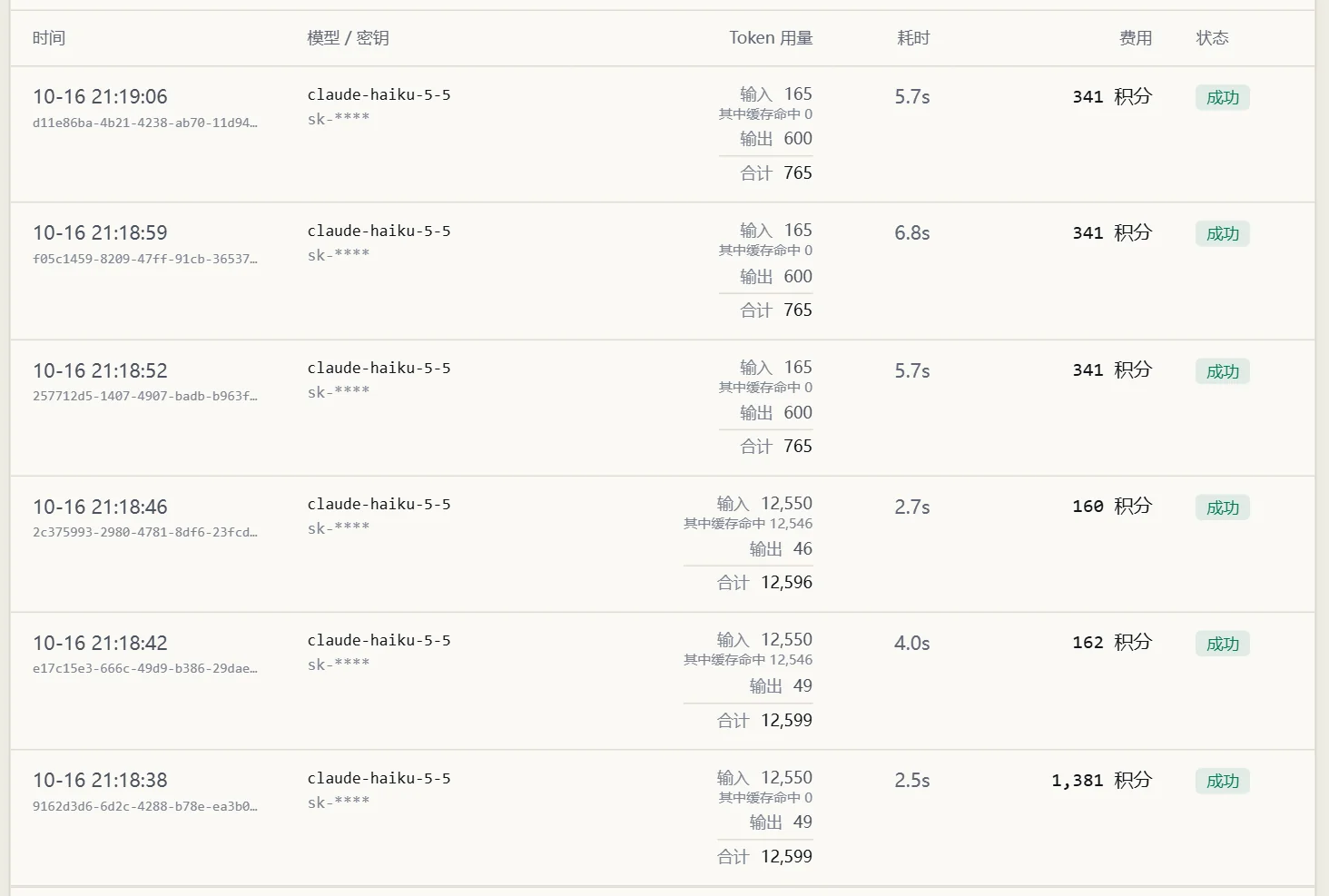
One thing needs a separate note. On the first long-input call, the API response reported 12,546 cache write tokens, but the Request log showed no separate cache write, and the call was billed at the plain input price (1,381 points, less than the cache write price would give). We saw this only once and can't yet say whether it always happens. When reconciling, go by the breakdown in the Request log.
gpt-6-luna went through the same three groups. prompt_tokens was identical within each group (323, 9,167 and 323), and the formula reproduced all 9 charges. Cache hits were billed at the cached read price here too: the 9,167-token long input cost 66 points the first time and 8 points after an 8,960-token cache hit. However, the short-in, long-out group produced 1,225–1,395 output tokens, above the 600 cap, and was billed as generated: output cap parameters such as max_tokens are currently not applied to GPT models. This is a known issue; until it is fixed, don't rely on them to control the cost of GPT models (see section 7 of the overview article).
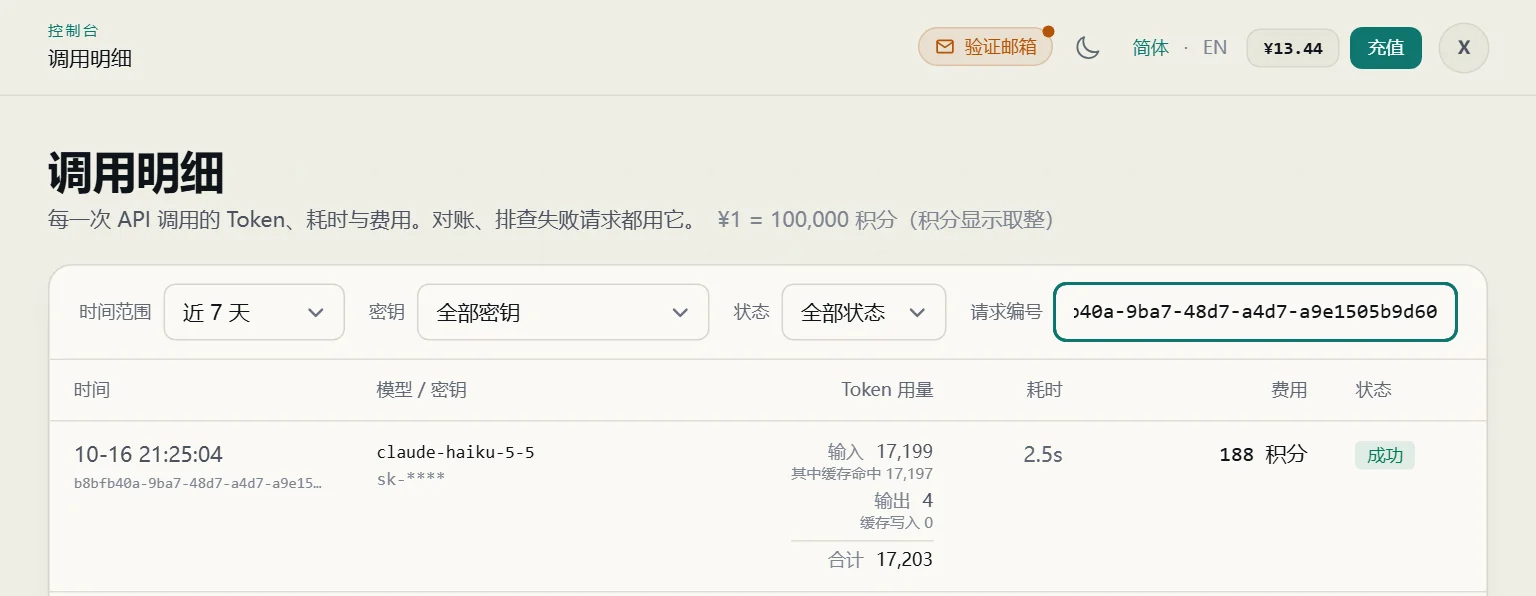
The native Anthropic endpoint reports usage differently. input_tokens excludes cached tokens, and cache reads and writes are reported in cache_read_input_tokens and cache_creation_input_tokens. In our test, the Request log's Input equalled input_tokens plus cache_read_input_tokens, and cache_creation_input_tokens appeared as Cache write and was billed separately at the cache write price. The screenshot below shows one call found by Request ID. The response had input_tokens 2 and cache_read_input_tokens 17,197; the log shows Input 17,199, incl. cache hits 17,197, and a cost of 188 points.
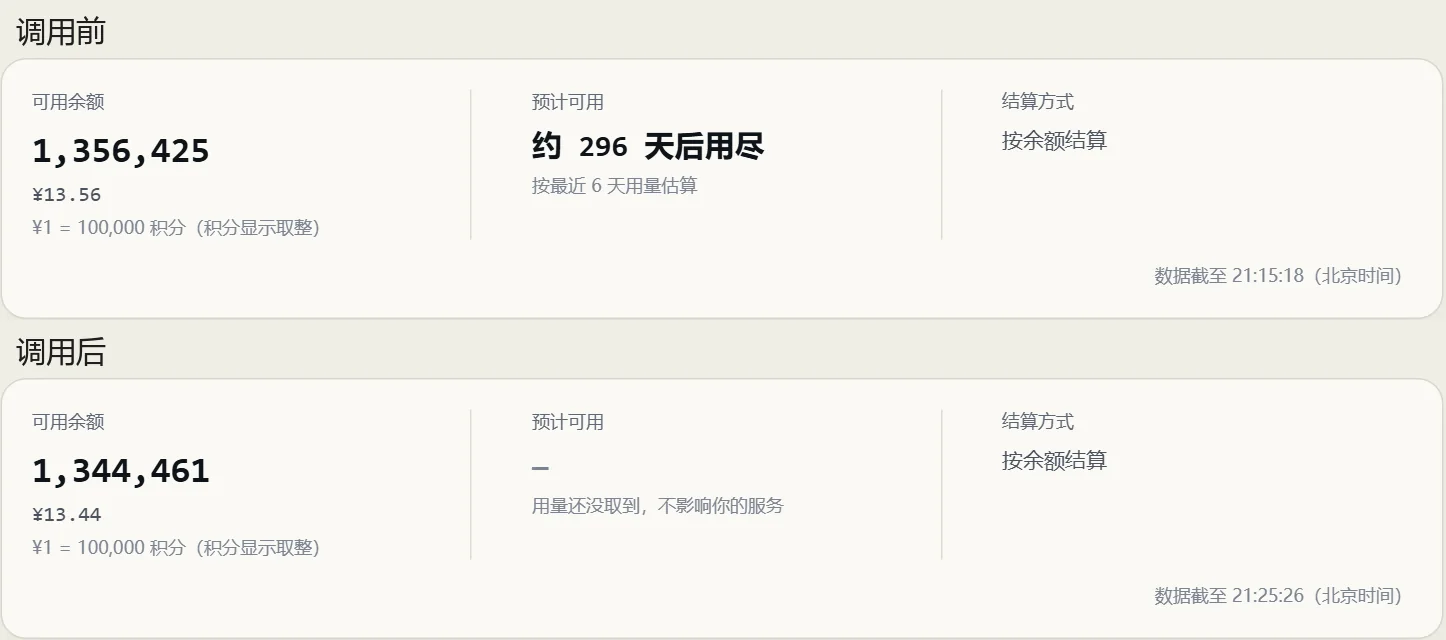
Balance check: the balance was 1,356,425 points before the test and 1,344,461 after, a difference of 11,964. The key made 48 calls in that window. The costs shown in the Request log add up to 11,939, and the exact formula total is 11,963.62, which matches the balance change. The 25-point gap is rounding: each row shows the cost rounded down to a whole number, while the balance is charged the exact amount. Also, 352 of those points came from another test program using the same key at the same time, which is why we suggest a dedicated test key.
Two more things. The Request log keeps individual calls for 40 days and only daily totals after that, so do any call-by-call reconciliation within 40 days. If you find a duplicate charge or a billing error, open a ticket with the request_ids; once it is confirmed, the overcharge is refunded (see Top-ups and Refunds). The minimum top-up is ¥10 and the balance never expires, so you can top up ¥10 and run the tests in this article first.
A bill that reconciles only shows that you were charged for actual usage. Whether you reached the model you paid for needs a different test; see How to Confirm You Are Calling the Real Model.