Articles
How to vet a cheap AI API relay: 5 common risks and how to test them
Data security, model swaps, inflated rates, inflated usage and account stability: how to test and judge each, then the same checklist applied to Xisu AI.
First, a note: cheap does not automatically mean unreliable. Price gaps can come from official discounts, caching, bulk purchasing or supplier strategy. This article does not assess any particular provider; it gives checks you can reproduce. Judge by API responses, billing records, privacy policies and stability data, not by price or by anyone's claims, ours included.
How to use this article: for each of the five risks below you get how to test and how to judge, followed by a summary table. Test only with made-up content. Never send real customer data, API keys or source code to any relay as a test, including us.
1. Data security: "a million tokens for one yuan, and your data is exposed"
Every request you send to a relay passes through its servers first. However low the price, find out what it does with that content before anything else.
How to test: check whether the policy covers these five things.
| Question | What to look for |
|---|---|
| Is request and reply content stored? | Whether it is stored by default; if so, what and who can see it |
| How long is it kept? | Retention for call records, content and logs, with actual numbers of days |
| Can staff access it? | When support or operations can see content, and whether access is audited |
| Can it be deleted? | Whether you can ask for deletion, and what happens when you close your account |
| Is it used for training or sold? | Whether "not used for training, not sold" is stated plainly |
Then walk through the process once with made-up text:
XISU_SECURITY_TEST_2026_001
Customer name: Test User A (fictional)
Order number: TEST-0000-0001 (fictional)
- Send one request with this text and note the request_id from the response header;
- check whether the console's call records show this content;
- ask support: can you see the content of this call? How long is it kept? Can it be deleted?
- compare what you saw and heard with the policy, point by point.
How to judge: no privacy policy, or one that only says "we value your privacy" with no scope or retention periods, counts as high risk. If the console or support can hand the content back to you verbatim while the policy says it is not stored, practice and policy disagree, which is also high risk.
Keep the other side in mind too: sending a test and seeing no leak does not prove anything is safe. You cannot see what happens on the server. What you can rely on is a clearly written policy and whether you can hold the provider to it when something goes wrong: an identifiable operator, a contact channel and a ticket trail.
2. Model swaps: "pay for the flagship, get the budget model"
First set aside some common but unreliable methods. At most they are weak signals:
- asking "who are you": one line of system prompt changes the answer, and genuine models often misidentify themselves;
- the
modelfield in the response: the server can change a string; - testing tool calls or strict JSON: these only show the capability exists, and cheap models have it too. To test structured output properly, use the API parameter
response_formatwithjson_schema(strict: true) rather than asking for JSON in the prompt.
How to test: three steps.
- Tokenizer fingerprint. The same text yields different
prompt_tokenswith different vendors' tokenizers. Run the check script from the verification article; a GPT model should match OpenAI's official tokenizer segment by segment. This step catches a different vendor. - Compare capability within the vendor. Large and small models from one vendor usually share a tokenizer, so step 1 misses them. Prepare 10–20 questions that separate them, run each 3 times on the official API and on the service under test at the same time, and compare pass rates.
- Reconcile by request_id. For every call, the model and token breakdown in the console should match the
usagein the response.
How to judge: tokenizer mismatches that persist across re-tests are high risk; passing all three steps means model identity is verified; step 1 alone only rules out a different vendor. The full script, the reasoning and a table of swap signals are in How to check you are getting the real model.
3. Inflated rates: "the unit price looks low, the bill is worse than official"
Key points:
- Compare only "price per 1M tokens", separately for input, output, cache reads and cache writes. Convert any "X% off", "multiplier" or "group ratio" back to that unit before comparing.
- Work out the top-up conversion. If what you top up is "credit", "dollars" or "points", first work out what one yuan actually buys.
- Don't look at the input price alone. Output usually costs several times as much as input, so comparing input prices badly understates the bill.
- Watch for charges outside the unit price: per-request fees, minimum spends, top-up fees.
Minimal check: take one real call, multiply its usage by the provider's published prices and compare with what was actually deducted. Then multiply the same usage by the official prices. The first should match; the second tells you how much you really save.
How to judge: all four prices published and your figure matches the deduction means verified; only a multiplier published but it matches after conversion is partly trustworthy; no way to work out a unit price, or a figure that doesn't match, is high risk. For the item-by-item method, see How to Check a Low-Cost API Relay's Bill and Token Usage.
4. Inflated usage: "use a thousand, get billed for three"
Key points:
- Token counts cannot be derived from character or word counts. Tokenizers differ by vendor; "1,000 words" is not 1,000 tokens.
- Input should be consistent, output should respect the cap. Even
temperature=0does not guarantee identical output, so don't compare output lengths. But if you send the same request several times,prompt_tokensshould be identical every time, andcompletion_tokensshould not exceed yourmax_tokens(for reasoning models, reasoning tokens are part ofcompletion_tokensand fall under the same cap). - Turn off the SDK's automatic retries (
max_retries=0). Otherwise a failed call may be resent silently and billed several times without your knowing. - Streaming requests need
stream_options={"include_usage": true}, or you get nousageto reconcile against.
Minimal check: with automatic retries off, pick a model (claude-haiku-5-5 in this example) and ask for a long answer, such as "Describe the giant panda in detail, at least 300 words", with max_tokens set to 50. Send the same request 3 times and note the 3 request_ids and their usage. You should see identical prompt_tokens all three times, and completion_tokens no higher than 50, with finish_reason set to length when the cap cuts it off. Then check the console: there should be exactly 3 calls, each with a token breakdown matching its usage.
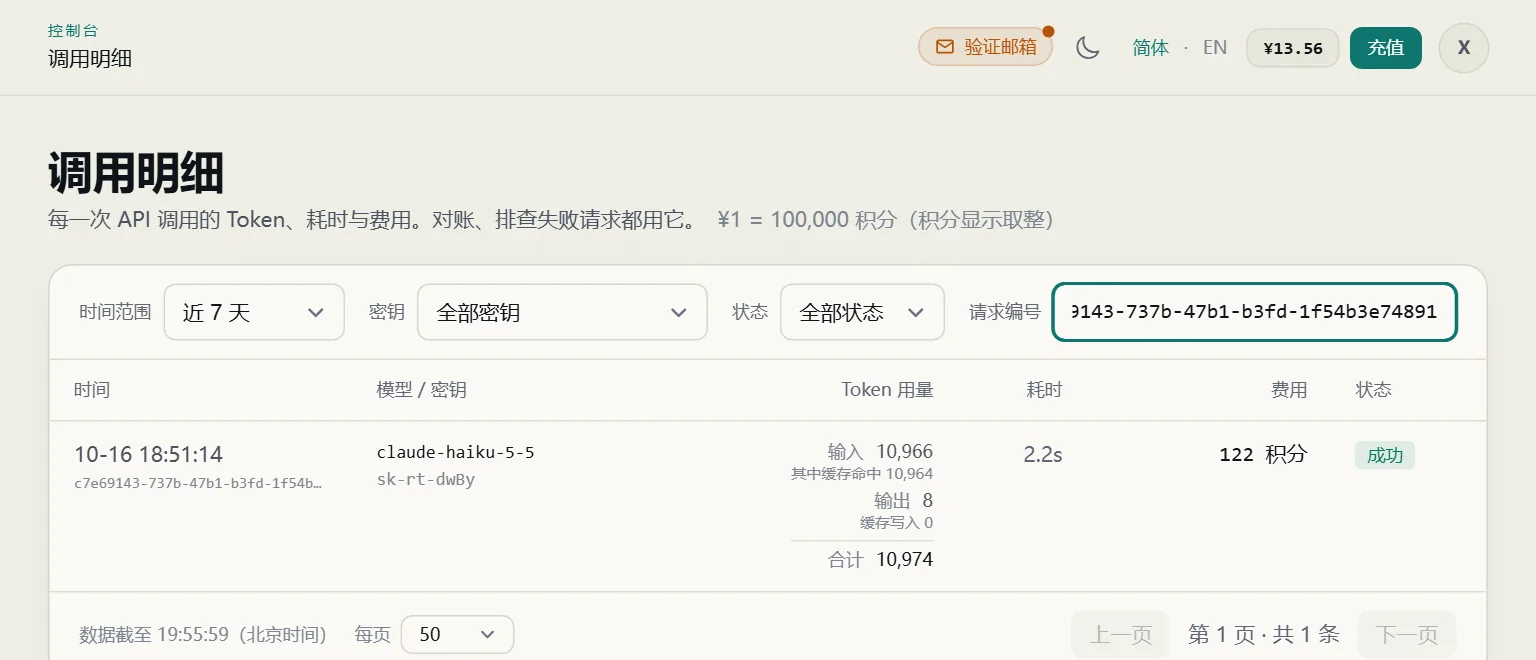
How to judge: matching call count and tokens means verified; a provider that only gives a summary bill with no per-call detail is at most partly trustworthy; extra calls, logged tokens higher than usage, or prompt_tokens that change for identical input are high risk. If completion_tokens exceeds max_tokens, either the cap is not being applied or the count is wrong; either way you are paying for the excess, so ask the provider to explain. Detailed steps and scripts are also in How to Check a Low-Cost API Relay's Bill and Token Usage.
5. Account sourcing and stability: "cut off in the middle of the night, your agents stop"
No prompt can test this. What accounts a provider uses behind the scenes, and how their risk controls stand, live on the server where your requests can't see them. What you can look at is operational evidence:
| What to look at | Why it matters |
|---|---|
| A public status page | Whether you can check availability at any time |
| Incident and maintenance history | What went wrong, how long recovery took, whether notice was given |
| Multiple keys | Whether you can split keys by workload so one problem doesn't take everything down |
| Low-balance alerts | Whether you are warned before your balance runs out instead of being cut off |
| Refund rules | Whether refunds for platform-caused outages are spelled out |
| What happens after a ban or shutdown | What happens to your balance, and how you are told |
How to test: run low-value, low-risk tasks for 3–7 days, covering both day and night, and record the failure rate, timeouts and error codes. Open one ticket along the way and see how long support takes to answer.
How to judge: a status page and incident history plus a clean trial means verified; a clean trial with no public status page or incident history is only partly trustworthy; frequent interruptions during the trial, or no explanation of shutdowns or bans, is high risk.
Protecting production: whichever provider you use, keep a backup, and don't tie critical agents to a single relay. At minimum your code should set timeouts, cap retries, and switch to a backup base_url when the primary fails. Here is runnable Python (pip install openai):
import os
import time

from openai import OpenAI, APIConnectionError, APIStatusError

# Primary route first, backup after it; URLs, keys and model names come from the environment.
PROVIDERS = [
    {"base_url": os.environ.get("PRIMARY_BASE_URL", "https://api.xisu.ai/v1"),
     "key_env": "PRIMARY_API_KEY", "model": os.environ.get("PRIMARY_MODEL", "gpt-6-luna")},
    {"base_url": os.environ.get("BACKUP_BASE_URL", ""),
     "key_env": "BACKUP_API_KEY", "model": os.environ.get("BACKUP_MODEL", "")},
]
RETRY_SAME = {429, 500, 502, 503, 504}  # worth one more try on the same route


def chat(messages, tries_per_provider=2):
    errors = []
    for p in PROVIDERS:
        key = os.environ.get(p["key_env"])
        if not (p["base_url"] and key and p["model"]):
            continue  # skip routes that aren't configured
        client = OpenAI(base_url=p["base_url"], api_key=key,
                        timeout=30,      # wait at most 30 seconds per request
                        max_retries=0)   # turn off SDK retries; the loop below decides
        for attempt in range(tries_per_provider):
            try:
                resp = client.chat.completions.create(
                    model=p["model"], messages=messages, max_tokens=200)
                return p["base_url"], resp
            except APIConnectionError as e:          # unreachable or timed out
                errors.append(f"{p['base_url']}: {type(e).__name__}")
            except APIStatusError as e:
                errors.append(f"{p['base_url']}: HTTP {e.status_code}")
                if e.status_code == 400:
                    raise                            # the request itself is wrong; switching won't help
                if e.status_code not in RETRY_SAME:
                    break                            # 401/403 etc.: don't retry, move to the next route
            time.sleep(2 ** attempt)                 # back off 1 s, then 2 s
    raise RuntimeError("All routes failed: " + "; ".join(errors))


if __name__ == "__main__":
    used, resp = chat([{"role": "user", "content": "Reply with OK only"}])
    print("route:", used)
    print("request_id:", resp._request_id)
    print("usage:", resp.usage.prompt_tokens, resp.usage.completion_tokens)
Set the PRIMARY_API_KEY environment variable before running. The backup route is used only if BACKUP_BASE_URL, BACKUP_API_KEY and BACKUP_MODEL are all set; otherwise it is skipped. Errors are handled differently by type:
- 400: the request itself is wrong and switching won't help, so it is raised;
- 401 / 403: the key or account on this route has a problem, so it moves to the next route without retrying;
- 429 / 5xx, connection failures or timeouts: it backs off and tries the same route once more, then moves on.
A request that timed out may still have run and been billed on the server, so always cap the number of retries. The backup route may use a different model name, so configure it separately.
6. Summary table
| Area | Verified | Partly trustworthy | High risk |
|---|---|---|---|
| Model identity | Tokenizer fingerprint passes, no clear capability gap within the vendor, request_id reconciliation matches | Only the tokenizer check was run, or no official account to compare with | Tokenizer mismatches persist across re-tests, or an expensive model performs like the vendor's small one |
| Price | All four unit prices published; your figure matches the deduction | Only a multiplier or discount published, matches after conversion | No way to work out a unit price, or your figure doesn't match |
| Usage | Per-call records match usage, call counts match, output stays within the cap |
Only a summary bill; or output exceeds max_tokens while per-call records still match usage |
Extra calls or tokens beyond usage; prompt_tokens vary for identical input |
| Data security | Policy states scope, retention periods, staff access conditions, deletion and no training, and practice matches it | A policy exists but lacks retention periods or scope | No policy, or practice contradicts it |
| Stability | Status page and incident history, 3–7 day trial without problems | Clean trial, but no public status page or incident history | Frequent interruptions during the trial; shutdowns or bans unexplained |
7. Holding Xisu AI to the same standard
Our prices are also below official prices (the Models page marks some models at 10–30% of the official price), so you are welcome to test us with the methods in this article. Here is an honest self-assessment:
| Check | Where Xisu AI stands today | Where to look |
|---|---|---|
| Privacy policy and retention | Yes. Request and reply content is not stored by default; per-call details are kept for 40 days, after which only daily totals remain; sign-in records 30 days; tickets are deleted 30 days after the last reply; data is never used for training or sold; you can ask to close your account through a ticket, and account details are then deleted. Requests have to be forwarded to the upstream model provider, and that leg is handled under the provider's own data policy | Privacy Policy |
| Staff access to content | Only when you agree in a ticket do we temporarily turn on content sampling for the key concerned: at most 24 hours, stored encrypted, deleted after 3 days, every activation and view audit-logged | Privacy Policy |
| Per-call reconciliation | Yes. Every call has a request_id (the x-request-id header), a token breakdown, latency, cost and status; failed requests are not billed |
Reconciling usage and bills |
| Published unit prices | Yes. Each model lists input, output, cache read and cache write prices; billing is by actual usage, settled when the call ends, with nothing held in advance | Models |
| Output cap parameters | Known issue at present. Tested on 2026-10-16: for GPT models, max_tokens, max_completion_tokens and max_output_tokens are not applied, so output can exceed the cap you set and is billed as generated; Claude models behave correctly. Until this is fixed, don't rely on these parameters to control the cost of GPT models |
— |
| Refunds for swapped models | Yes. With evidence, and once verified, the affected charges are refunded | Top-ups and refunds |
| Key controls | Yes. IP allowlist, model scope, per-key budget, rotation with a grace period, revocation; you can create multiple keys | Data security and API key security |
| Low-balance alerts | Yes. When the balance drops below ¥10 you get a console notification and an email to your verified address; you are notified again when the balance runs out and new requests are refused. Each kind of alert is sent at most once every 24 hours | Top-ups and refunds |
| Maintenance and change notices | Yes. The official announcements page | Announcements |
| Support channels | Tickets on the site, Telegram @xisuai_support | — |
| Public status page | Not at present | — |
| Public incident history | Not at present | — |
| SLA | Not at present | — |
| Upstream sources | Upstream accounts and supply sources are not disclosed | — |
By the standard in section 6, our stability can at best be rated partly trustworthy for now, and you need your own trial to judge it. Usage reconciles call by call, but until the GPT output cap issue is fixed, usage is also only partly trustworthy. We suggest starting with a ¥10 test top-up (see Top-ups and refunds), running low-risk tasks for a few days, and only then deciding whether to put us into production. Keeping a backup provider for critical work applies to us as well.