Articles
Claude Code, Codex CLI, and Cursor with One API: Setup and Troubleshooting
Configure Claude Code, Codex CLI, and Cursor with one API key. Learn base URLs, protocols, model selection, platform-specific setup, and error troubleshooting.
Yes, they can share one API, but you should not enter the same complete URL in all three tools: Claude Code uses Anthropic Messages, Codex CLI uses OpenAI Responses, and Cursor uses OpenAI Chat Completions. The most common sources of errors are whether /v1 is included in base_url, whether the model name matches the protocol, and whether the client has actually loaded the new environment variables.
When configuring the tools, you can use the same key for all three, or create a separate key for each. The first approach is simpler; the second makes it easier to separate billing, set budgets, and identify which tool generated a request.
- This article is for developers getting started with LLM APIs, individual users who want to connect coding tools to a third-party API, and experienced users troubleshooting protocol and model issues.
- Last updated: 2026-10-17
- Tested or documented environments: the Claude Code tutorial was recorded with Claude Code 2.1.300; the Codex CLI tutorial was recorded with codex-cli 0.162.1; the Cursor section is based on Cursor's official documentation, and the platform has not yet completed a full hands-on test.
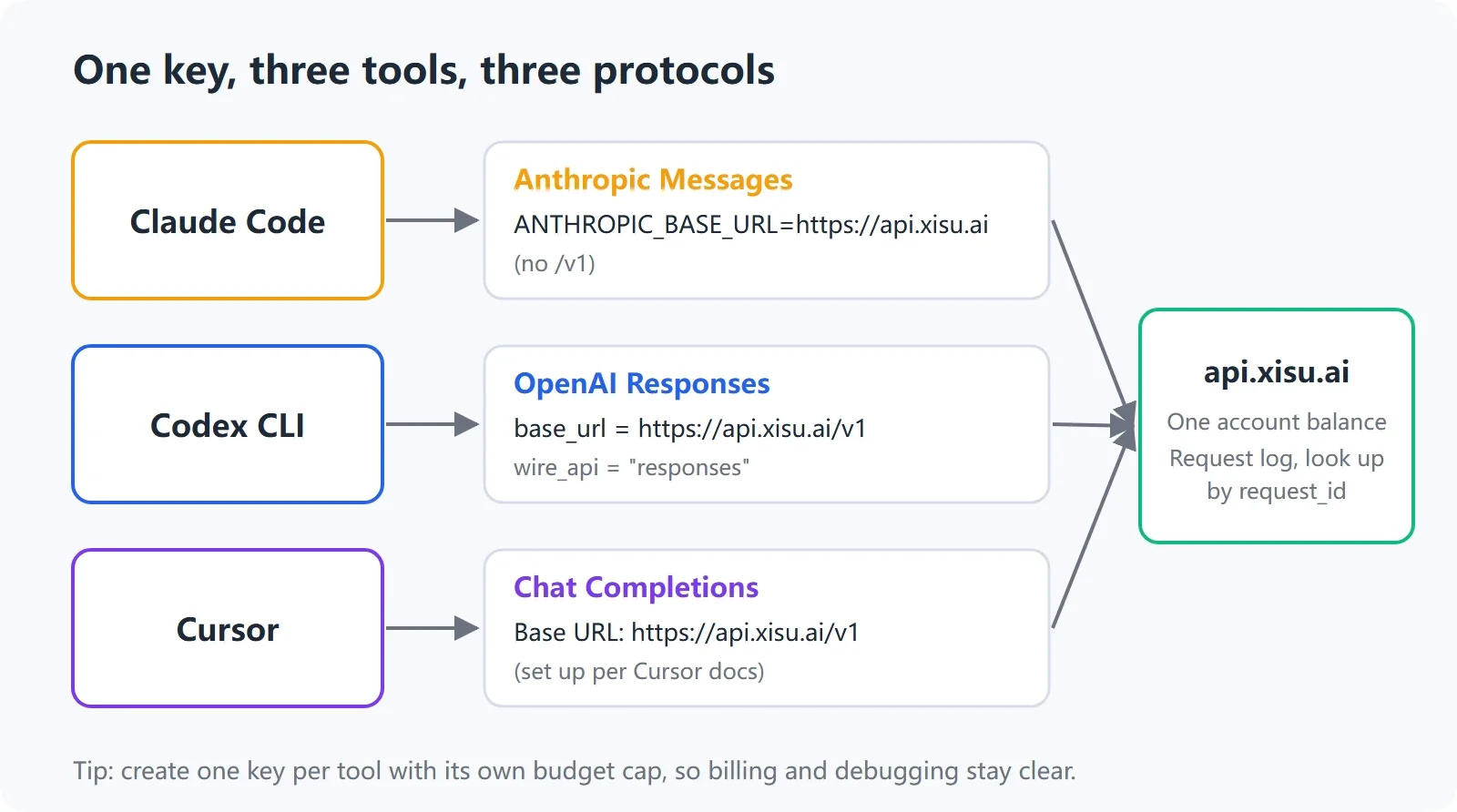
Claude Code, Codex CLI, and Cursor use separate protocols while sharing one account
1. The short answer: each tool uses its own protocol endpoint
In simple terms: an API is like a reception desk, base_url is the desk's address, the API key is your access card, and the model name is the service you ask for. The three tools can use the same access card, but they submit different forms, so each must use its corresponding endpoint.
| Tool | Protocol | How to enter base_url | Where to put the key | How to enter the model name | Recommended default model | Configuration file |
|---|---|---|---|---|---|---|
| Claude Code | Anthropic Messages | https://api.xisu.ai, without /v1 |
ANTHROPIC_AUTH_TOKEN or the env section in settings.json |
Enter the Claude model ID directly | claude-sonnet-5-5 |
~/.claude/settings.json |
| Codex CLI | OpenAI Responses | https://api.xisu.ai/v1 |
XISU_API_KEY |
Enter a model ID supported by Responses directly | gpt-5.6-terra |
~/.codex/config.toml |
| Cursor | OpenAI Chat Completions | https://api.xisu.ai/v1 |
Cursor Settings > Models > OpenAI API Key | Add a model name matching the one returned by the endpoint | gpt-5.6-terra |
Cursor settings |
The platform's OpenAI-compatible API documentation explains that custom clients usually only require changes to base_url and the API key. The native Anthropic endpoint requires the URL to point to the root address without /v1. Start with the OpenAI-compatible integration guide, Anthropic Messages guide, and endpoints and authentication guide.
2. Understand these three concepts first
1. What is base_url?
base_url is the base address a client uses when constructing API paths. Clients often do not request only the string you enter; they append a path to it. For example, Claude Code appends /v1/messages, so it uses https://api.xisu.ai; Codex CLI requests /v1/responses, so it uses https://api.xisu.ai/v1.
If you set Claude Code to https://api.xisu.ai/v1, the final path may become /v1/v1/messages. The usual result is a 404 or a message such as “There's an issue with the selected model”. That message does not necessarily mean the model name is wrong; check the URL first.
2. What is an API key?
An API key identifies your account, balance, plan, and budget. The examples in this article use only sk-xxxx or environment variable names; never put a real key in source code, configuration repositories, or screenshots.
OpenAI-compatible endpoints use Authorization: Bearer; Anthropic Messages endpoints use x-api-key and also accept Bearer authentication. Both protocols can use the same key and balance, but clients use different names for the key variable.
3. What is a model name?
The model name is the model field in the request body. It must be an actual model ID provided by the platform and supported by the current endpoint. A model name is not a display name such as “Claude” or “GPT”, nor is it an arbitrary custom label in Cursor's dropdown.
We recommend calling GET /v1/models first, then copying the returned model ID exactly into the tool configuration. Available models may differ by protocol: Claude Code can use only Claude models through Messages, while the Responses endpoint has its own set of available models.
3. How are the three protocols different?
In simple terms: all three protocols “send messages and receive answers”, but their request fields, response fields, and streaming termination methods differ. If a tool is hard-coded for one protocol, changing only the model name will not fix the problem.
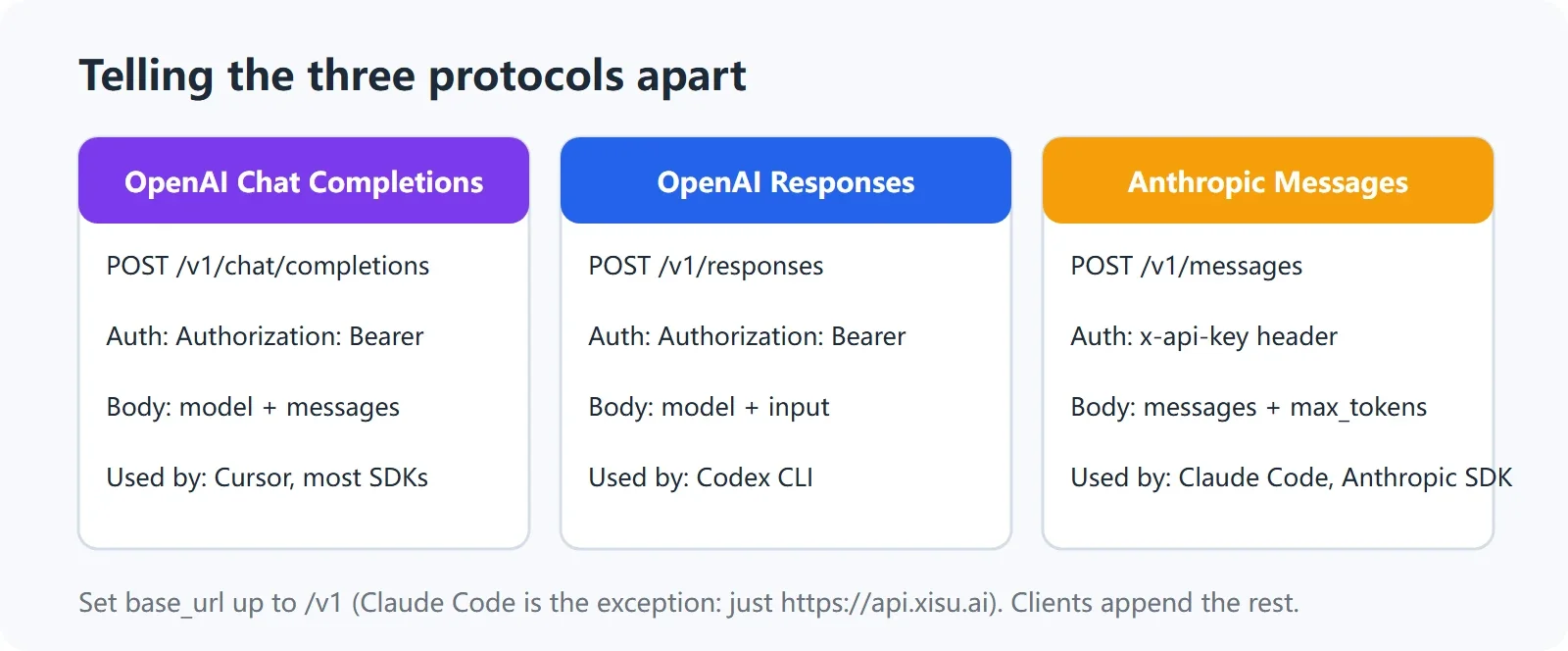
Comparison of the Chat Completions, Responses, and Anthropic Messages protocols
| Protocol | Endpoint path | Key request fields | How to read the response | Used by |
|---|---|---|---|---|
| OpenAI Chat Completions | /v1/chat/completions |
messages, max_tokens |
choices[0].message.content |
Cursor, many desktop clients, and traditional OpenAI SDK calls |
| OpenAI Responses | /v1/responses |
input, instructions, max_output_tokens |
output or the SDK's output_text |
Codex CLI and the responses interface in the OpenAI SDK |
| Anthropic Messages | /v1/messages |
model, messages, max_tokens |
Anthropic's native message structure | Claude Code and the Anthropic SDK |
Chat Completions usually stores multi-turn history in messages. For Responses, you must include the complete input history; the platform gateway does not support previous_response_id. Anthropic Messages uses Anthropic's message format. For more detailed field differences, see the Responses endpoint guide.
4. Step 0: verify the key and model with curl first
In simple terms: do not start by debugging Claude Code or Codex. First confirm that the key can list models, then test Chat Completions and Messages separately. This separates client configuration issues from API availability issues.
macOS/Linux: list models
export XISU_API_KEY="sk-xxxx"
curl https://api.xisu.ai/v1/models \
  -H "Authorization: Bearer $XISU_API_KEY"
A successful response contains a model list. Focus on the HTTP status code and model IDs. If you receive 401, first check the key, environment variable, and IP allowlist.
Windows PowerShell: list models
$env:XISU_API_KEY = "sk-xxxx"
Invoke-RestMethod -Uri "https://api.xisu.ai/v1/models" -Headers @{ Authorization = "Bearer $env:XISU_API_KEY" }
PowerShell parses the JSON into an object and displays the result. A variable set with $env: is valid only for the current session. If you use a persistent user variable, reopen PowerShell after setting it.
macOS/Linux: test Chat Completions and Anthropic Messages
curl https://api.xisu.ai/v1/chat/completions \
  -H "Authorization: Bearer $XISU_API_KEY" \
  -H "Content-Type: application/json" \
  -d '{
    "model": "gpt-5.6-terra",
    "messages": [{"role": "user", "content": "Explain an API in one sentence"}],
    "max_tokens": 100
  }'

curl https://api.xisu.ai/v1/messages \
  -H "x-api-key: $XISU_API_KEY" \
  -H "anthropic-version: 2023-06-01" \
  -H "Content-Type: application/json" \
  -d '{
    "model": "claude-sonnet-5-5",
    "max_tokens": 100,
    "messages": [{"role": "user", "content": "Explain an API in one sentence"}]
  }'
A successful Chat Completions response usually contains choices and the answer content; a successful Messages response contains Anthropic-shaped content. The Claude test must use a Claude model. Do not send a GPT model to Messages.
Windows PowerShell: test the two chat endpoints
$headers = @{
  Authorization = "Bearer $env:XISU_API_KEY"
  "Content-Type" = "application/json"
}
$chatBody = @{
  model = "gpt-5.6-terra"
  messages = @(@{ role = "user"; content = "Explain an API in one sentence" })
  max_tokens = 100
} | ConvertTo-Json -Depth 5
Invoke-RestMethod -Uri "https://api.xisu.ai/v1/chat/completions" -Method Post -Headers $headers -Body $chatBody

$anthropicHeaders = @{
  "x-api-key" = $env:XISU_API_KEY
  "anthropic-version" = "2023-06-01"
  "Content-Type" = "application/json"
}
$messageBody = @{
  model = "claude-sonnet-5-5"
  max_tokens = 100
  messages = @(@{ role = "user"; content = "Explain an API in one sentence" })
} | ConvertTo-Json -Depth 5
Invoke-RestMethod -Uri "https://api.xisu.ai/v1/messages" -Method Post -Headers $anthropicHeaders -Body $messageBody
If both requests return answers, the key and basic API are probably working. If one tool still fails, focus on its protocol, base_url, model name, and configuration load order.
5. Claude Code configuration
In simple terms: Claude Code needs to know three things: where to send requests, which key to use, and which Claude model to use by default.
- Install Claude Code. The tutorial was recorded with version 2.1.300. If the installer requires Node.js 22 or later, run
node -vfirst to check. - Set
ANTHROPIC_BASE_URL,ANTHROPIC_AUTH_TOKEN,ANTHROPIC_MODEL, andANTHROPIC_DEFAULT_HAIKU_MODEL. - Open a new terminal, change to your project directory, and run
claude. - Once in a session, run
/statusto confirm that the base URL, authentication variable, and model are correct.
macOS/Linux environment variables
cat >> ~/.zshrc <<'EOF'
export ANTHROPIC_BASE_URL="https://api.xisu.ai"
export ANTHROPIC_AUTH_TOKEN="sk-xxxx"
export ANTHROPIC_MODEL="claude-sonnet-5-5"
export ANTHROPIC_DEFAULT_HAIKU_MODEL="claude-haiku-5-5"
EOF
source ~/.zshrc
claude -p "Explain in one sentence what you can do"
macOS uses ~/.zshrc by default. If you use Bash, replace the filename with ~/.bashrc. If the non-interactive command returns a sentence, the basic connection is usually working.
Windows PowerShell environment variables
[Environment]::SetEnvironmentVariable("ANTHROPIC_BASE_URL", "https://api.xisu.ai", "User")
[Environment]::SetEnvironmentVariable("ANTHROPIC_AUTH_TOKEN", "sk-xxxx", "User")
[Environment]::SetEnvironmentVariable("ANTHROPIC_MODEL", "claude-sonnet-5-5", "User")
[Environment]::SetEnvironmentVariable("ANTHROPIC_DEFAULT_HAIKU_MODEL", "claude-haiku-5-5", "User")

# Close the current PowerShell window and open a new one
claude -p "Explain in one sentence what you can do"
No output usually means the variables were written successfully. An already-open terminal cannot see newly written user environment variables, so you must close and reopen PowerShell.
Using ~/.claude/settings.json
If you do not want to modify system environment variables, put the configuration in ~/.claude/settings.json. On Windows, use %USERPROFILE%\.claude\settings.json.
{
  "env": {
    "ANTHROPIC_BASE_URL": "https://api.xisu.ai",
    "ANTHROPIC_AUTH_TOKEN": "sk-xxxx",
    "ANTHROPIC_MODEL": "claude-sonnet-5-5",
    "ANTHROPIC_DEFAULT_HAIKU_MODEL": "claude-haiku-5-5"
  }
}
The key is stored in plain text in this configuration file. A safer approach is to keep only the URL and model in settings.json, store the key in an environment variable, and include the configuration file in your Git checks.
Check the model and special behaviors
Use claude-sonnet-5-5 for everyday coding, consider claude-opus-5-5 for difficult problems and large refactors, and use claude-haiku-5-5 for simple or background tasks. Claude Code supports only Claude models. Calling a non-Claude model through /v1/messages returns a 404 not_found_error.
After entering a session, run /status. You should see information similar to: Auth token: ANTHROPIC_AUTH_TOKEN, Anthropic base URL: https://api.xisu.ai, and Model: the model you configured.
The tutorial recorded several easy-to-miss behaviors: the first request may write a prompt cache of about 30,000 tokens, which expires after roughly 5 minutes; subsequent requests during continuous work may hit the cache. Claude Code's WebSearch tool is not supported by this endpoint and may return 400 server-side tool 'web_search_20250305' is not enabled on this endpoint. If you do not want it to keep trying, add the following to settings.json:
{
  "permissions": {
    "deny": ["WebSearch"]
  }
}
When the key is invalid, Claude Code may retry silently for a long time. Press Ctrl+C to exit, then use claude --debug to look for 401 clues.
6. Codex CLI configuration
In simple terms: Codex CLI uses the Responses protocol, so the URL must include /v1, and you must explicitly set wire_api = "responses".
- Install it with
npm i -g @openai/codex. - Create
.codex/config.tomlin your user directory. - Set the
XISU_API_KEYenvironment variable. - Run
codexorcodex exec, then check the provider through the output and/status.
Complete config.toml
model_provider = "xisu"
model = "gpt-5.6-terra"

[model_providers.xisu]
name = "Xisu AI"
base_url = "https://api.xisu.ai/v1"
wire_api = "responses"
env_key = "XISU_API_KEY"

[windows]
sandbox = "unelevated"
On macOS/Linux, the file is ~/.codex/config.toml. On Windows, use .codex\config.toml under your user directory. If the file already contains settings, put the first two lines at the top and the provider section at the end. Do not accidentally overwrite existing configuration.
Create the file and set the key
mkdir -p ~/.codex
cat > ~/.codex/config.toml <<'EOF'
model_provider = "xisu"
model = "gpt-5.6-terra"
[model_providers.xisu]
name = "Xisu AI"
base_url = "https://api.xisu.ai/v1"
wire_api = "responses"
env_key = "XISU_API_KEY"
EOF
echo 'export XISU_API_KEY="sk-xxxx"' >> ~/.zshrc
source ~/.zshrc
codex --version
codex
Seeing output such as codex-cli 0.162.1 means the version check succeeded, although the version may have changed. In PowerShell, use:
New-Item -ItemType Directory -Force "$env:USERPROFILE\.codex" | Out-Null
notepad "$env:USERPROFILE\.codex\config.toml"
[Environment]::SetEnvironmentVariable("XISU_API_KEY", "sk-xxxx", "User")
# Close PowerShell and open it again
codex --version
codex
env_key in the configuration tells Codex CLI which environment variable contains the key; the key itself should not be written to TOML. In interactive mode, run /status. Only when you see Model provider: xisu can you confirm that requests are going through the platform.
Run tasks and configure the Windows sandbox
cd your-project-directory
codex exec -s workspace-write --skip-git-repo-check "Create a file named hello.txt with the content hi"
-s workspace-write allows changes to the current working directory; the default is usually a read-only sandbox. The tutorial's 0.162.1 removed --full-auto, so using it produces unexpected argument '--full-auto' found. If you are not running inside a Git repository, add --skip-git-repo-check.
If Windows reports that it cannot create a sandbox with administrator privileges, choose a non-admin sandbox. You can also add [windows] and sandbox = "unelevated" to the configuration. Parameters may change in newer versions; use codex --help as the authority.
The Responses endpoint does not store sessions, so it does not support previous_response_id. For multi-turn conversations, the client must include the complete history in input. Normal Codex CLI usage does not depend on this field.
7. Cursor configuration
The platform has not completed a full hands-on Cursor test. The steps below are compiled from Cursor's official documentation, so the interface may vary with your installed version. Include the request_id when reporting an issue.
In simple terms: Cursor's custom OpenAI API entry point is under Settings > Models. Enter an OpenAI API Key, enable the option to use your own key, and turn on Override OpenAI Base URL. Cursor's official documentation states that custom API keys are mainly for standard chat models. Features requiring specialized models, such as Tab Completion, may still use Cursor's own models.
- Open Cursor Settings.
- Go to Models.
- Enter
sk-xxxxunder OpenAI API Key, enable the option to use your own OpenAI API Key, and click Verify. - Enable Override OpenAI Base URL.
- Enter
https://api.xisu.ai/v1. - Add the platform's actual model name through the model list or custom model entry, such as
gpt-5.6-terra. - Save the settings, reopen a chat window, and select the model you added.
Cursor's official page states that after an API key is configured, it directly calls the corresponding model provider. Custom keys apply only to standard chat models; features such as Tab Completion continue to use built-in models. Check the current Cursor interface and official documentation for the exact capabilities available.
Cursor's model name must exactly match the model ID expected by the endpoint. If the model list is empty, first confirm that the key is valid and the balance is not negative, then check whether the client requested /v1/models. If Cursor still connects to the old service after you enter the URL, restart Cursor and refresh the model list.
8. Choosing models for the three tools
In simple terms: filter by protocol first, then choose by task. For Claude Code, start with Claude models; for Codex CLI, choose a GPT model available through Responses; for Cursor, confirm that the model you added can be called through Chat Completions.
| Task type | Recommended models | Reason |
|---|---|---|
| Everyday coding and general refactoring | claude-sonnet-5-5 or gpt-5.6-terra |
A good balance of capability and price, making them suitable defaults. |
| Difficult problems, complex debugging, and large refactors | claude-opus-5-5, gpt-6.1-sol |
Better suited to tasks requiring stronger analysis and planning; their price tiers are relatively higher. |
| Simple Q&A, titles, and lightweight edits | claude-haiku-5-5, gemini-3.8-flash-high, gpt-6-luna |
Suitable for lightweight tasks and background requests, with price tiers better suited to controlling everyday usage. |
| Comparing GPT, Claude, and Gemini | gpt-5.6-terra, claude-sonnet-5-5, gemini-3.8-flash-high |
Validate each through its corresponding protocol endpoint, then choose based on code style and task performance. |
Do not rely on memory for exact prices. Refer to the model pricing table / model marketplace. Whether a model can use a particular protocol must also be confirmed against /v1/models, the models available in the console, and actual request results.
9. Troubleshooting: check the status code, then the request_id
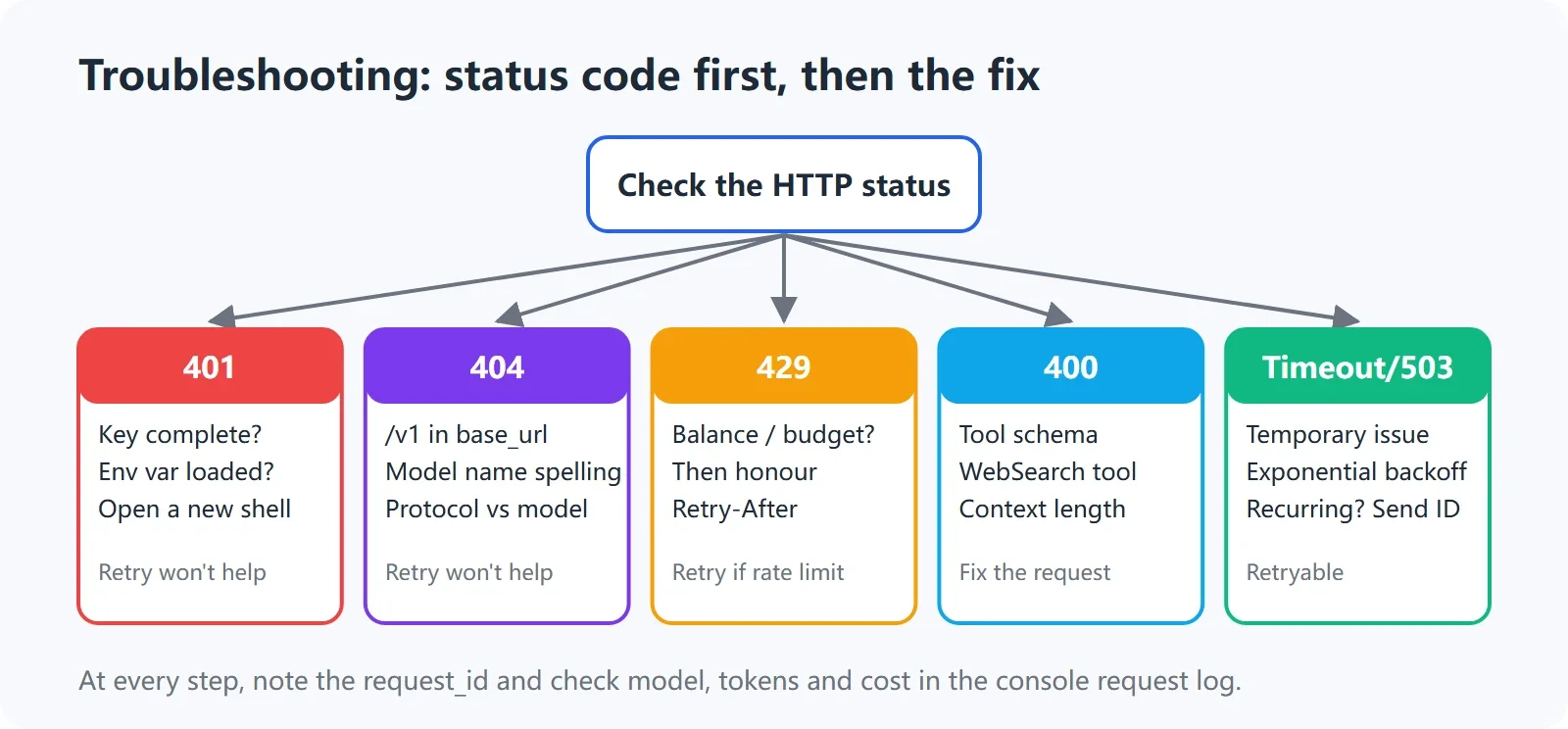
Troubleshooting coding-tool integration errors by routing them according to status code
In simple terms: an error code does not mean “try again” in every case. A 401 usually means authentication; a 404 usually means a path or endpoint capability issue; with a 429, distinguish rate limiting from insufficient balance first; a 503 is the case where waiting and retrying according to Retry-After is appropriate.
| Error | Common causes | Order of operations |
|---|---|---|
| 401 | Invalid key, variable not applied, terminal not restarted, or IP allowlist mismatch | Check key integrity, environment variables, source IP, request headers, and console status. |
| 404 | Claude Code URL includes an extra /v1, misspelled model name, or model is not part of the current protocol |
Check the final path, then confirm that the model matches Messages or Responses. |
| 429 | Rate limit, insufficient balance, or key budget exhausted | Check balance and budget first; only apply Retry-After backoff after confirming it is a rate limit. |
| 400 | Invalid parameter format or unsupported tool schema; server-side tools such as WebSearch are unavailable | Read the error message, remove unsupported fields, or disable the relevant tool. |
| 503 | overloaded_error or temporarily unavailable upstream capacity |
Read Retry-After, wait, and retry with a new request. |
| timeout | Upstream queueing, a client timeout that is too short, or an interrupted network connection | Increase the timeout as appropriate; after a disconnect, start a new request because this API has no resume semantics. |
401: first confirm which key the request actually uses
After setting a persistent environment variable in Windows, you must reopen PowerShell. After writing to a shell configuration file on macOS/Linux, run source ~/.zshrc or open a new terminal. Claude Code can use /status to check the authentication variable name and base_url. If the key has an IP allowlist, a source address outside the list also returns 401.
404: distinguish a path error from an unsupported endpoint
Claude Code must use https://api.xisu.ai, not a URL containing /v1. Codex CLI and Cursor use https://api.xisu.ai/v1. If the model name is correct but you send a GPT model to Anthropic Messages, you may receive a 404 not_found_error. Waiting and retrying will not fix this; use a Claude model or switch to an OpenAI endpoint that supports the model.
429: distinguish rate limiting from insufficient balance
If you confirm that the issue is a request-frequency limit, back off according to Retry-After and use exponential backoff with a maximum retry count. Under the Anthropic protocol, insufficient balance, exhausted quota, or a key budget limit may also appear as a 429 rate_limit_error. Check the balance and budget first rather than simply waiting.
400: tool schemas and WebSearch
Custom function tools must conform to the schema accepted by the endpoint. See the tool-schema rejection troubleshooting guide. Claude Code's WebSearch is a server-side tool and returns 400 when unsupported by this endpoint. File operations, command execution, and WebFetch are not affected by this limitation.
For more status-code, rate-limit, and retry guidance, see the error codes and rate limiting guide. If you receive a 503 overloaded_error or Responses' no_available_channel, resources are usually temporarily unavailable. Back off for the time specified in the response, then send a new request.
10. How to inspect request_id, tokens, and costs
In simple terms: do not look only at the final sentence displayed by the client. The response headers or body usually contain a request_id. Search for it in the console request logs to associate the model, tokens, error, and cost with the correct request.
- Find the request_id in the client or debug log.
- Open the console and search for the request_id in the request logs or call details.
- Check the actual model name, protocol endpoint, input tokens, output tokens, cache writes, cache reads, and cost.
- If the client reports failure but the balance changed, use the console call details as the primary reference, then investigate using the request time and request_id.
In Claude Code, use /status to view the current authentication, URL, and model. Refer to the console call details for token and cost breakdowns. Responses from Codex CLI usually contain input_tokens and output_tokens; Chat Completions commonly uses prompt_tokens and completion_tokens. Anthropic Messages uses its native usage fields.
The platform does not store Responses conversations server-side, so do not rely on previous_response_id for automatic continuation. For multi-turn cost reconciliation, include the complete history as the input for the current request and compare each request in the console. See the usage and billing reconciliation guide for more information.
11. Security and billing-isolation recommendations
In simple terms: the fact that you can share one key does not mean you should. Sharing can be convenient during development, but separating keys by tool or project is better for long-term use.
- Create separate keys for Claude Code, Codex CLI, and Cursor so you can view billing by tool.
- Set a budget limit for each key to prevent a background task from retrying continuously.
- Store keys only in environment variables, the system credential store, or protected local configuration. Never commit them to Git.
- Add local configuration files containing keys to
.gitignore, and search forsk-,ANTHROPIC_AUTH_TOKEN, andXISU_API_KEYbefore committing. - If you suspect a key has been exposed, disable or regenerate it immediately in the console, then check request logs and the IP allowlist.
For more complete key-management recommendations, see the key security guide. In production, also set reasonable timeouts, a limited retry count, log redaction, and request correlation IDs. See the production guide for deployment recommendations.
If you are ready to start, go to the console to create a key, then follow the Claude Code tutorial and Codex CLI tutorial step by step. Client installers are available from the downloads page. Complete the three curl checks in Step 0 before connecting a specific tool; this makes later troubleshooting much easier.
FAQ
Can one API key be used by Claude Code, Codex CLI, and Cursor at the same time?
Yes. The three tools can share one key and balance, but each must use the correct protocol endpoint: Claude Code uses Anthropic Messages, Codex CLI uses Responses, and Cursor uses Chat Completions. If you want separate billing or budgets, create one key for each tool.
Why can't Claude Code's base_url include /v1?
Claude Code appends /v1/messages itself. If you enter https://api.xisu.ai/v1, the final path may become /v1/v1/messages, resulting in a 404 or a selected-model message. Claude Code should use https://api.xisu.ai.
Why must Codex CLI include wire_api = "responses"?
Codex CLI uses the OpenAI Responses protocol, whose request path is /v1/responses. wire_api = "responses" tells the client to use the Responses request and response format instead of sending Chat Completions requests.
Why is the model list still empty after I enter a custom URL in Cursor?
First confirm that Use Your Own OpenAI API Key is enabled in Cursor and that you entered https://api.xisu.ai/v1. Then confirm that the key is valid, the balance is normal, and the model name exactly matches an ID returned by the API. Restart Cursor or refresh the model list and try again. Cursor's custom-key feature has limitations for certain specialized models; follow the current official documentation.
What happens if I put a GPT model in ANTHROPIC_MODEL for Claude Code?
Claude Code uses Anthropic Messages, and this endpoint serves only Claude models. Sending a GPT model to Messages may return a 404 not_found_error. To use GPT, switch to the corresponding OpenAI-compatible endpoint in Codex CLI or Cursor.
Does a 429 always mean I have to wait?
Not necessarily. A 429 may mean rate limiting, insufficient balance, exhausted quota, or a key budget limit. Under the Anthropic protocol, the latter cases may also appear as rate_limit_error. Check the balance, key budget, and response message first; use Retry-After backoff only after confirming that it is a rate limit.
Why does Claude Code produce no output for a long time after starting?
According to the tutorial notes, Claude Code may retry for a long time when the key is invalid. Press Ctrl+C to exit, check that the key is complete and contains no spaces, reload the environment variables, and use claude --debug to check for a 401.
What should I do if Codex CLI reports --full-auto as an unknown argument?
The codex-cli 0.162.1 recorded in the tutorial removed --full-auto. To allow writes to the current directory, use -s workspace-write; if you are not running in a Git repository, also add --skip-git-repo-check. For newer versions, use codex --help as the authority.
Does the Responses API support previous_response_id?
The platform gateway does not support previous_response_id and returns 400. For multi-turn conversations, the client must save the history and include the complete content in the next request's input.
References
- Cursor API Keys official documentation
- Cursor Models official documentation
- Anthropic Claude Code LLM Gateway documentation
- OpenAI Responses API official documentation
- Google Gemini OpenAI compatibility documentation
- The platform's OpenAI-compatible integration guide
- The platform's Anthropic Messages guide
- The platform's OpenAI Responses guide
- The platform's endpoints and authentication guide
- The platform's error codes and rate limiting guide
Models, client parameters, and official interfaces may change with new versions. Always use the console and the relevant official pages as the source of truth for available models, prices, endpoint capabilities, and client behavior.