Articles
GPT, Claude, Gemini API Pricing: What Does 1 Million Tokens Cost?
Compare GPT, Claude, Gemini, and Grok API costs per million tokens, including caching, real-world scenarios, calculators, and curl examples.
Here is the short answer: 1 million tokens does not have a fixed price. You need to consider four factors together: input, output, cached input, and cache writes. Even for the same model, the actual cost can vary by an order of magnitude between chat, long-context processing, and Agent tasks. Based on the prices and scenario assumptions in this article, a normal chat may cost only a fraction of a yuan to a few cents, while an Agent task involving about 20 rounds of calls may cost anywhere from a few tenths of a yuan to several yuan.
If you want to connect an API to your own application or coding tool, estimate the cost from your actual token usage first, then compare model prices instead of looking only at the “input price.” Start by choosing a model from the model pricing table, create a key in the console, and then follow the 5-minute integration guide to complete your first call.
- This article is for developers new to LLM APIs, users adding an API to a personal project, and users configuring coding assistants or Agents.
- Last updated: 2026-10-17.
- Data and testing environment: the platform’s price data was current as of 2026-10-17 16:35 Beijing time. Official caching behavior, pricing, and subscription information are based on the official pages checked on 2026-10-17.
- Price units: unless otherwise stated, all tables use RMB yuan per 1 million tokens. The platform’s internal top-up unit is credits; ¥1 = 100,000 credits.
1. Understanding Tokens: How Much Text Is 1 Million Tokens?
In plain English: A token is the unit a model uses to read and write text. You can think of it as a “text fragment” on an LLM bill, but it is not necessarily one Chinese character, one word, or one byte.
There is no single answer to how many Chinese characters make up one token because the result varies by tokenizer. For plain Chinese text, you can use 600,000 to 1.5 million Chinese characters as a rough estimate for 1 million tokens. The estimate becomes less reliable as the proportion of code, English, numbers, URLs, JSON, and mixed text increases. This is only a rule-of-thumb conversion and should not replace the usage data returned by the API.
The most reliable approaches are these two. First, inspect the usage field in the response after an actual call and record input tokens, output tokens, and cached tokens separately. Second, on an endpoint that supports it, call /v1/messages/count_tokens to count a message before sending it, then decide whether to truncate, summarize, or send it in batches.
- Prepare real business text instead of testing only with “Hello.” Tokenization ratios for short text do not represent code, long documents, or multi-turn conversations.
- Send the request and save the
usageobject in the response, along withmodel,request_id, and the timestamp. - Compare text length, token count, and actual cost together to establish your own average conversion factor.
- After launch, continue using request logs and console usage details as the source of truth. Do not estimate your long-term bill with “character count × a fixed ratio.”
import os
from openai import OpenAI

client = OpenAI(
    api_key=os.environ.get("XISU_API_KEY", "sk-xxxx"),
    base_url="https://api.xisu.ai/v1",
)

response = client.chat.completions.create(
    model="gpt-6.1-sol",
    messages=[
        {"role": "user", "content": "Explain in three sentences what a token is."}
    ],
    max_tokens=200,
)

print(response.choices[0].message.content)
print(response.usage)
print("prompt_tokens:", response.usage.prompt_tokens)
print("completion_tokens:", response.usage.completion_tokens)
If the call succeeds, you will see the model response and a usage object. Record prompt_tokens and completion_tokens in particular. If the model or compatibility layer returns cache fields, also record cached_tokens or prompt_tokens_details.cached_tokens.
2. Why Pricing Is Split into Four Components
In plain English: A request is not billed only for input. It may generate four separate token charges: regular input, cache reads, cache writes, and output.
The pricing formula is:
Cost = regular input tokens × input price + cached input tokens × cache read price + cache write tokens × cache write price + output tokens × output price
Divide the result by 1,000,000 to get the actual amount when prices are quoted per million tokens. Cache terminology and cache lifetimes vary between providers, so in production you should rely on the relevant model’s usage fields and official pricing page.
| Cost component | What it represents | Typical impact |
|---|---|---|
| Input | Input tokens in the request that were not reused from cache. | System prompts, user questions, conversation history, tool definitions, and file contents may all count. |
| Output | New tokens generated by the model. | Output prices are usually significantly higher than input prices. For most models in this comparison, they are about 3–6 times the input price. |
| Cache reads | Input tokens served from an existing cache entry. | The more repeated the context and the more consistently the cache is hit, the greater the savings. |
| Cache writes | Tokens written to the cache for the first time so they can be reused. | The first request may cost more than regular input; subsequent repeated requests use the cache read price. |
You cannot look only at the input price for three main reasons. First, output prices are usually higher, so long answers, code generation, and reasoning tasks increase output costs. Second, Agents repeatedly carry system prompts, tool instructions, repository summaries, and state, making their total input far greater than that of normal chat. Third, repeated Agent context is often suitable for caching, so cache read and cache write prices directly determine long-term cost.
Official APIs also implement caching differently. OpenAI Prompt Caching focuses primarily on reusable prompt prefixes. Supported models automatically try to reuse identical prefixes and return cached token counts in usage. Cached tokens are billed at a lower price, with the exact multiplier varying by model.
Anthropic Prompt Caching usually marks cacheable content with cache_control and distinguishes base input, cache writes, and cache hits. Its official pricing page also distinguishes 5-minute and 1-hour cache writes, while cache reads are usually priced well below base input.
Gemini offers implicit caching as well as explicit context caching for some APIs and models. Its official documentation states that cache reads appear in usage metadata. Explicit caching may also involve the number of cached tokens and storage duration, so check the model page for current pricing and support.
For example, OpenAI’s official documentation indicates that prompt caching generally requires a sufficiently long, stable prefix. Cache read and write rates are not one universal fixed value. Gemini’s official documentation indicates that implicit caching generally requires a similar prefix to recur within a short period. Anthropic requires you to explicitly set cache control points in message content. Do not transfer one provider’s cache parameters directly to another.
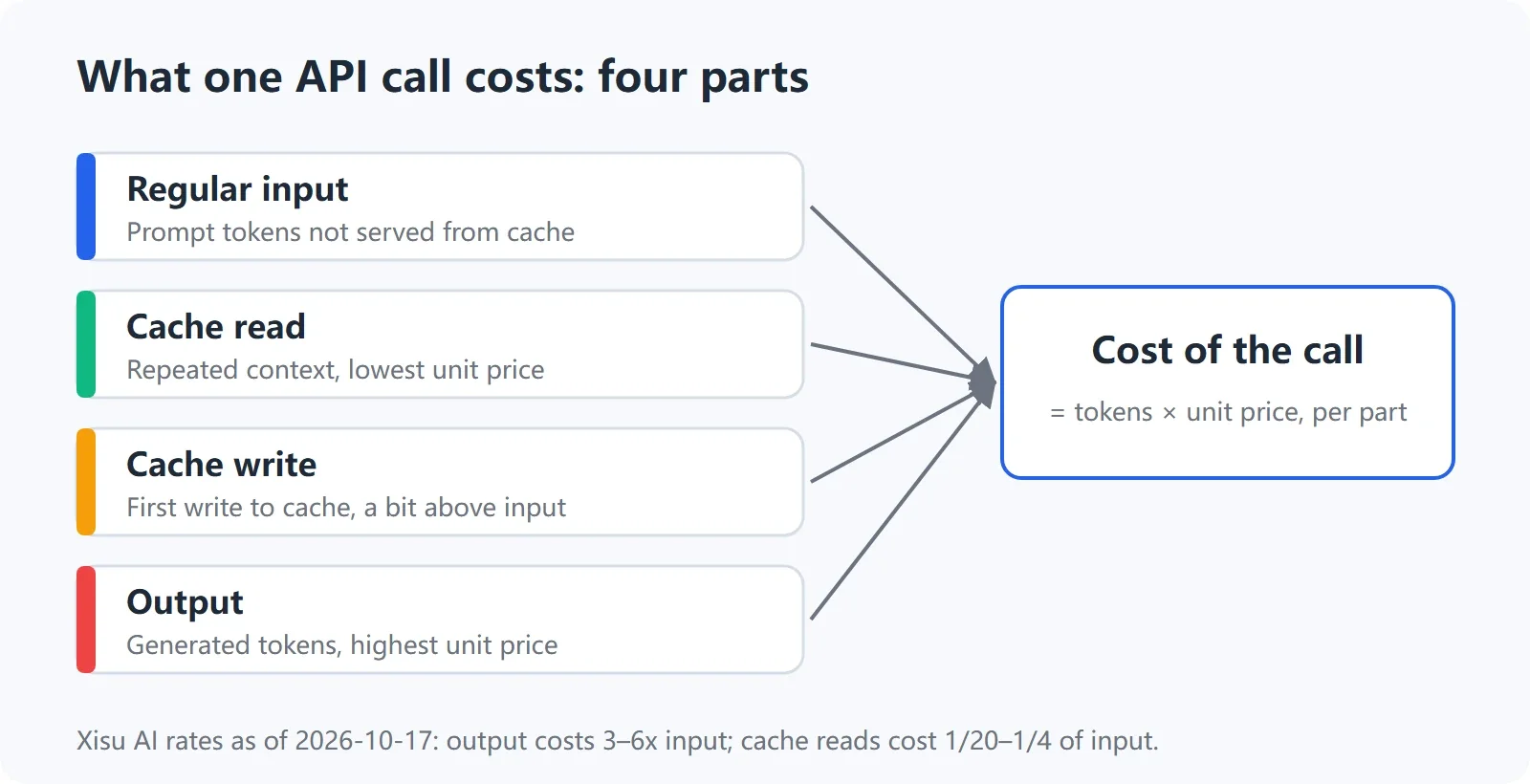
The cost of one call equals regular input plus cache reads, cache writes, and output
How to Design Requests That Are More Likely to Hit the Cache
In plain English: Put content that rarely changes first, and the question that changes every time last.
- Put stable system prompts, role descriptions, tool schemas, project rules, and repository summaries at the beginning.
- Put the current user question, timestamp, random numbers, temporary state, and this round’s tool results at the end.
- Do not reorder the entire prompt because an unrelated field changed; doing so may break prefix matching.
- Save usage for every call and verify that cache reads and writes actually occurred instead of inferring them from the request structure.
3. Model Price Comparison: Check Per-Million-Token Prices, Then Apply Your Scenario
In plain English: Per-million-token pricing is useful for side-by-side comparisons, but your final choice should also account for your input/output ratio, cache hit rate, and number of calls.
Price data was current as of 2026-10-17. This article is updated once a month. The data below comes from the platform’s pricing table and was current as of 2026-10-17 16:35 Beijing time. The platform bills by actual usage; ¥1 = 100,000 credits. “Official reference price” means the dollar price inferred from the discount labels in the pricing table, using the exchange rate shown on the page of approximately ¥7.2 = $1. These figures are inferred from the discount labels; refer to each provider’s official pricing page for authoritative prices.
| Model | Platform discount | Input ¥ | Output ¥ | Cache read ¥ | Cache write ¥ | Official reference input/output $ |
|---|---|---|---|---|---|---|
| claude-opus-5-5 | 30% of list price | 8.64 | 43.20 | 0.432 | 17.28 | 4.00 / 20.00 |
| claude-sonnet-5-5 | 30% of list price | 4.32 | 21.60 | 0.216 | 5.40 | 2.00 / 10.00 |
| claude-haiku-5-5 | 30% of list price | 1.08 | 5.40 | 0.108 | 2.16 | 0.50 / 2.50 |
| gpt-6.1-sol | 10% of list price | 1.44 | 7.20 | 0.072 | 1.80 | 2.00 / 10.00 |
| gpt-5.6-terra | 10% of list price | 1.44 | 8.64 | 0.144 | 1.80 | 2.00 / 12.00 |
| gpt-6-luna | 10% of list price | 0.072 | 0.36 | 0.0072 | 0.09 | 0.10 / 0.50 |
| gemini-4-argon-high | 10% of list price | 1.44 | 7.20 | 0.072 | 1.44 | 2.00 / 10.00 |
| gemini-3.8-flash-high | 10% of list price | 0.54 | 2.70 | 0.054 | 0.54 | 0.75 / 3.75 |
| grok-4.7 | 10% of list price | 1.44 | 4.32 | 0.36 | 1.44 | 2.00 / 6.00 |
One important clarification: the “official reference price” in the table is inferred from the platform’s discount labels and is not a provider quotation. Official pricing pages from OpenAI, Anthropic, Google, and xAI may also vary by context length, batch processing, service tier, or region, and may change over time. Before making a formal comparison, open the official pricing pages in the references and verify the current figures. For the complete list of 19 models, refer to the model pricing table. Current availability is also determined by that page; this article does not claim that every model is available.
In addition, the gpt-image-2.5 image-generation series is billed per image at 4,500 credits per image, or approximately ¥0.045. Image pricing should not be mixed directly with per-million-token prices for text models.
4. Four Real-World Scenarios: What Does 1 Million Tokens Actually Cost?
In plain English: The cost of the same model varies by task depending on input volume, output volume, and whether repeated context hits the cache.
The following figures use the scenario assumptions defined in this article:
- Normal chat: 2,000 input tokens and 500 output tokens per call, with no caching.
- Long-document summarization: 50,000 input tokens and 2,000 output tokens per call.
- One coding-assistant round: 30,000 input tokens, including 25,000 cache-read tokens, and 2,000 output tokens.
- One Agent task: approximately 20 rounds, with 600,000 total input tokens, including 30,000 cache-write tokens, 500,000 cache-read tokens, and 70,000 regular input tokens, plus 30,000 output tokens.
| Model | Chat | Long document | One coding round | One Agent task |
|---|---|---|---|---|
| claude-opus-5-5 | 0.0389 | 0.5184 | 0.1404 (0.3456) | 2.6352 (6.4800) |
| claude-sonnet-5-5 | 0.0194 | 0.2592 | 0.0702 (0.1728) | 1.2204 (3.2400) |
| claude-haiku-5-5 | 0.0049 | 0.0648 | 0.0189 (0.0432) | 0.3564 (0.8100) |
| gpt-6.1-sol | 0.0065 | 0.0864 | 0.0234 (0.0576) | 0.4068 (1.0800) |
| gpt-5.6-terra | 0.0072 | 0.0893 | 0.0281 (0.0605) | 0.4860 (1.1232) |
| gpt-6-luna | 0.0003 | 0.0043 | 0.0013 (0.0029) | 0.0221 (0.0540) |
| gemini-4-argon-high | 0.0065 | 0.0864 | 0.0234 (0.0576) | 0.3960 (1.0800) |
| gemini-3.8-flash-high | 0.0024 | 0.0324 | 0.0095 (0.0216) | 0.1620 (0.4050) |
| grok-4.7 | 0.0050 | 0.0806 | 0.0248 (0.0518) | 0.4536 (0.9936) |
The figures in parentheses for the coding assistant and Agent represent the cost without caching. They are not additional charges. They are comparison values calculated by billing the same token counts entirely at the regular input price, helping you determine whether caching is worth designing for.
For Claude Code, an experience recorded in the site’s guide is that the first request writes approximately 30,000 tokens to the cache, which remains valid for about 5 minutes. Actual requests should still be checked against response usage and console request logs. Do not treat this experience-based figure as fixed for every client or session.
Two monthly estimates:
- 50 chat calls per day using gpt-6.1-sol, calculated over 30 days: 50 × 30 × 0.0065 = ¥9.75.
- 5 Agent tasks per day using claude-sonnet-5-5, calculated over 30 days: 5 × 30 × 1.2204 = ¥183.06.
These are scenario assumptions, not billing guarantees. Actual token usage is determined by response usage and console request logs. Console usage details record model, key, input, output, cache reads, itemized charges, status, and request_id. Do not reconcile accounts using only one total token count. See How to reconcile usage and billing.
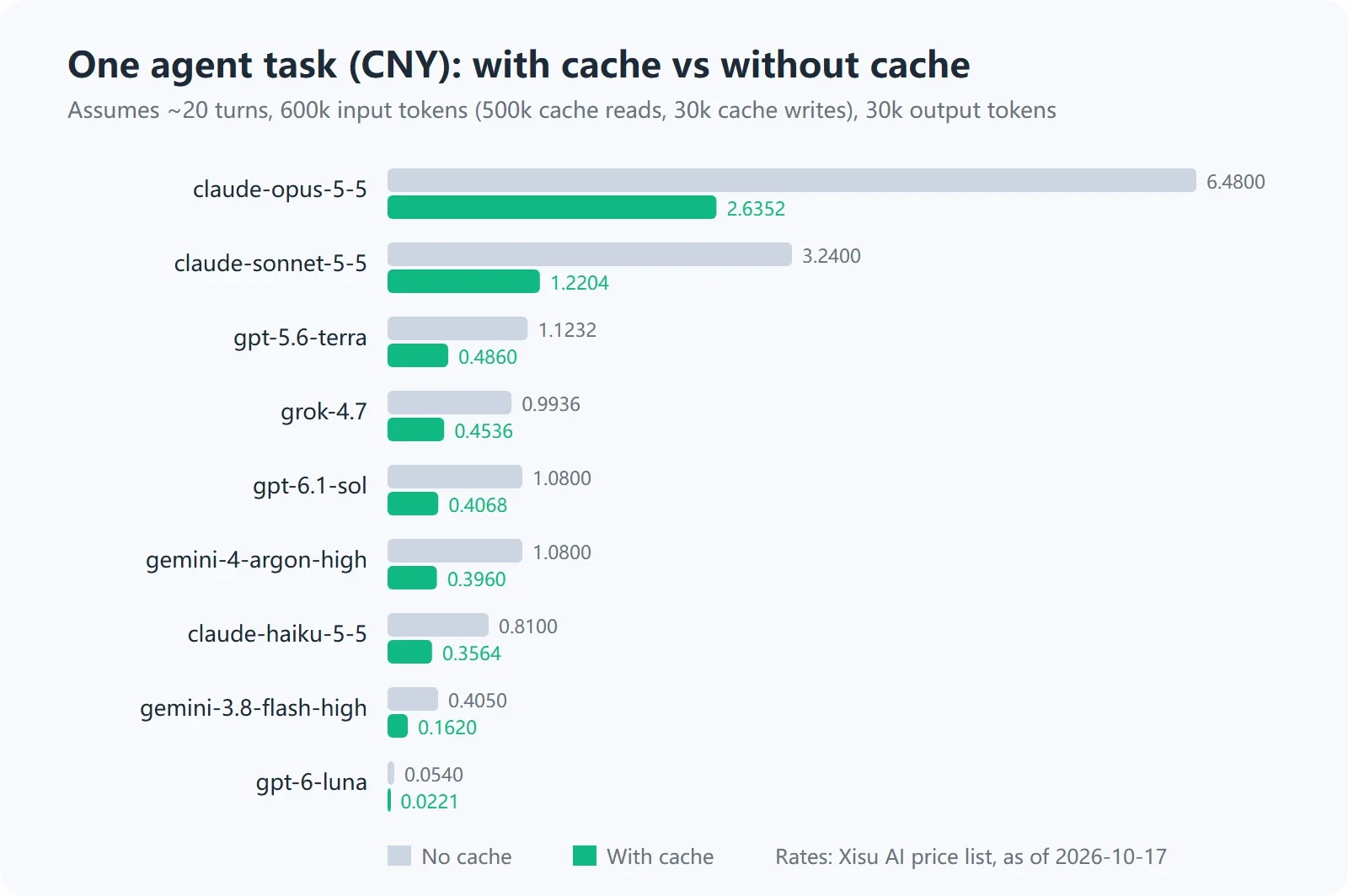
Cost comparison for the same Agent task with and without cache hits, based on platform prices as of 2026-10-17
5. Official APIs, Subscriptions, and Third-Party APIs: Which Should You Choose?
In plain English: A subscription buys usage or features within a specific product. An official API bills by interface usage. A third-party API typically provides multiple models through one unified endpoint, which suits users who want fewer code changes, centralized top-ups, and unified billing reconciliation.
| Option | How it is billed | Who it suits | Can it be used with your own applications or coding tools? | Typical payment method |
|---|---|---|---|---|
| Official API | Billed by model, input and output tokens, caching, batch processing, or service tier. Refer to the provider’s official pricing page. | Teams that need the provider’s official controls, capabilities, or enterprise API management. | Yes. You typically need an official API account, key, and payment configuration. | Credit card, billing account, prepaid balance, or enterprise settlement method supported by the provider. |
| Subscription | Paid monthly or annually, usually with limits on messages, models, tools, or coding-product usage. | Individual users who mainly work in a web, desktop, mobile, or official coding product. | Generally not equivalent to API balance. Anthropic, for example, explicitly states that Claude Pro does not include Console API usage; OpenAI also states that ChatGPT Plus and API usage are billed separately. | Use the payment methods supported by the product and your region. |
| Third-party API | May settle by actual token usage, model unit price, cache components, and account balance. | Individual developers who need one base_url for multiple models, want to test several models, or prefer local payment methods. | Usually yes, provided the client supports a compatible protocol or custom base_url. | Use the methods supported by the platform; this platform supports Alipay and WeChat Pay. |
Subscription prices vary by region, product tier, and time. This article does not list specific figures; check the official ChatGPT, Claude, and Google AI pages before purchasing. The only point to remember is that subscription allowances and API usage are separate accounts. A subscription cannot be used as API balance.
If you choose a third-party API, check at least these six points:
- Whether billing is based on actual token usage rather than rough deductions by call count.
- Whether input, output, cache reads, and cache writes are shown separately.
- Whether billing precision is high enough, especially for low-priced models where rounding could create errors.
- Whether request logs can be reconciled one by one using request_id.
- Whether balances expire, and how failed requests, interrupted streams, and requests with no output are billed.
- Whether you can verify that the request reached the actual model rather than relying only on the model name entered in the client. See How to verify that you are calling the real model.
The platform bills by actual usage, with precision to 10 decimal places. Credits do not expire; ¥1 = 100,000 credits. The minimum top-up is ¥10, and Alipay and WeChat Pay are supported. Usage is settled after the call rather than prepaid. Failed requests are not billed. If a streaming response disconnects midway, the portion already generated is billed as usual.
6. Cost Calculators: Convert Usage Directly into Money
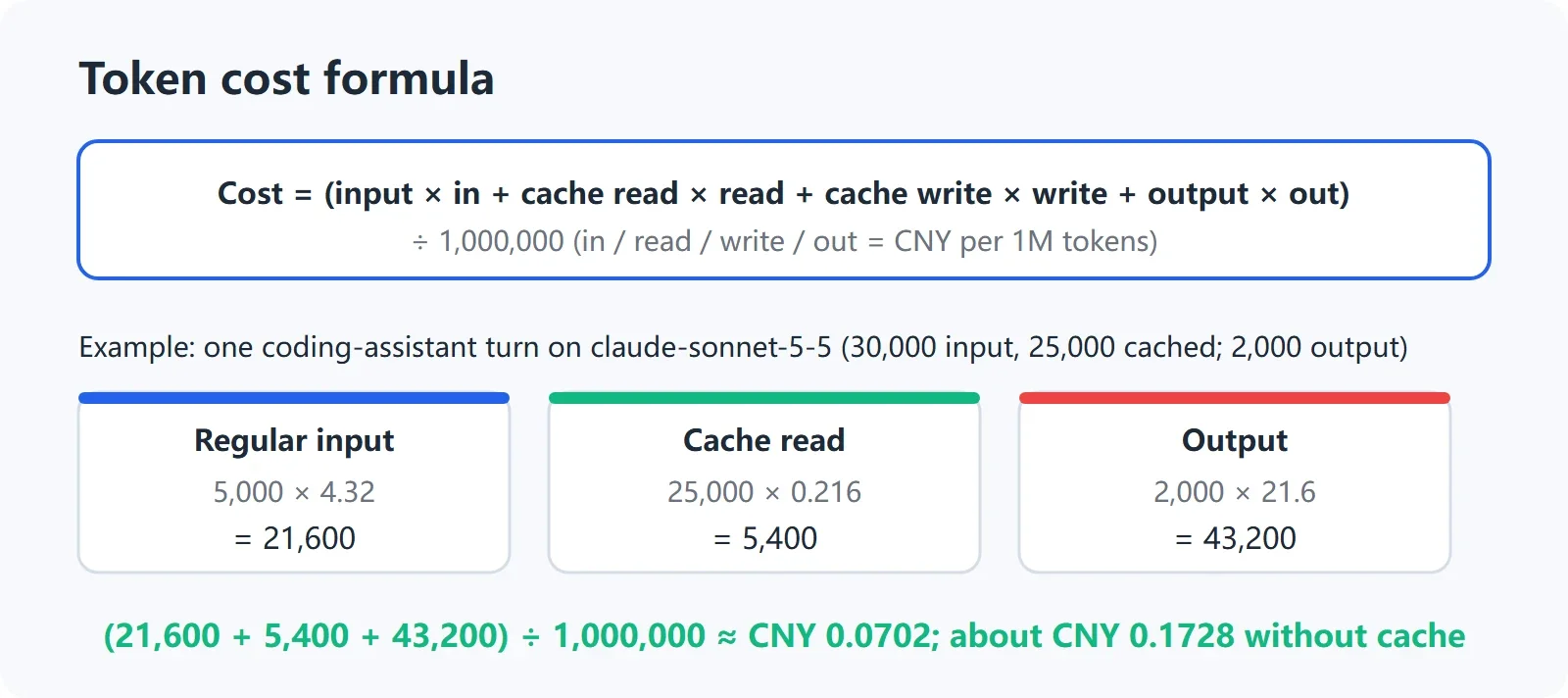
Cost formula and an example for one claude-sonnet-5-5 coding-assistant round
In plain English: A cost calculator does not guess token counts. It simply applies the itemized token counts and unit prices you already have to the formula.
Cost = (regular input × input price + cache reads × cache read price + cache writes × cache write price + output × output price) ÷ 1,000,000
The following Python function includes prices for four models, in yuan per million tokens. You can replace them with the current figures from the pricing table.
PRICES = {
    "gpt-6.1-sol": {"input": 1.44, "output": 7.20, "cache_read": 0.072, "cache_write": 1.80},
    "gpt-6-luna": {"input": 0.072, "output": 0.36, "cache_read": 0.0072, "cache_write": 0.09},
    "gemini-3.8-flash-high": {"input": 0.54, "output": 2.70, "cache_read": 0.054, "cache_write": 0.54},
    "claude-sonnet-5-5": {"input": 4.32, "output": 21.60, "cache_read": 0.216, "cache_write": 5.40},
}

def estimate_cost(model, normal_input, cache_read, cache_write, output):
    p = PRICES[model]
    total = (
        normal_input * p["input"]
        + cache_read * p["cache_read"]
        + cache_write * p["cache_write"]
        + output * p["output"]
    ) / 1_000_000
    return round(total, 10)

print(estimate_cost("gpt-6.1-sol", 2000, 0, 0, 500))
print(estimate_cost("claude-sonnet-5-5", 70000, 500000, 30000, 30000))
The first line returns approximately 0.0065 yuan, and the second approximately 1.2204 yuan. Tiny differences from the table are usually caused by display precision or rounding.
Here is a JavaScript version you can run directly in a browser console:
const prices = {
  "gpt-6.1-sol": { input: 1.44, output: 7.20, cacheRead: 0.072, cacheWrite: 1.80 },
  "gpt-6-luna": { input: 0.072, output: 0.36, cacheRead: 0.0072, cacheWrite: 0.09 },
  "gemini-3.8-flash-high": { input: 0.54, output: 2.70, cacheRead: 0.054, cacheWrite: 0.54 },
  "claude-sonnet-5-5": { input: 4.32, output: 21.60, cacheRead: 0.216, cacheWrite: 5.40 }
};

function estimateCost(model, normalInput, cacheRead, cacheWrite, output) {
  const p = prices[model];
  const total = (
    normalInput * p.input +
    cacheRead * p.cacheRead +
    cacheWrite * p.cacheWrite +
    output * p.output
  ) / 1000000;
  return Number(total.toFixed(10));
}

console.log(estimateCost("gpt-6.1-sol", 2000, 0, 0, 500));
console.log(estimateCost("claude-sonnet-5-5", 70000, 500000, 30000, 30000));
The browser console will output two numbers corresponding to normal chat and an Agent task with caching. In a real project, you can move prices into backend configuration so that price changes do not require republishing frontend code.
Make Your First Chat Completions Call with curl
macOS/Linux:
export XISU_API_KEY="sk-xxxx"
curl https://api.xisu.ai/v1/chat/completions \
  -H "Content-Type: application/json" \
  -H "Authorization: Bearer $XISU_API_KEY" \
  -d '{
    "model": "gpt-6.1-sol",
    "messages": [
      {"role": "user", "content": "Explain a token in one sentence."}
    ],
    "max_tokens": 100
  }'
Windows PowerShell:
$env:XISU_API_KEY = "sk-xxxx"
$body = @{
  model = "gpt-6.1-sol"
  messages = @(
    @{ role = "user"; content = "Explain a token in one sentence." }
  )
  max_tokens = 100
} | ConvertTo-Json -Depth 5

Invoke-RestMethod `
  -Uri "https://api.xisu.ai/v1/chat/completions" `
  -Method Post `
  -Headers @{ Authorization = "Bearer $env:XISU_API_KEY" } `
  -ContentType "application/json" `
  -Body $body
In the response body, first check whether choices[].message.content contains model text, then inspect usage. OpenAI Chat Completions-compatible responses generally include prompt_tokens and completion_tokens. If caching is available, it may appear in prompt_tokens_details.cached_tokens or a cached_tokens field provided by the compatibility layer. Fields may vary by model and endpoint. If a field is missing, do not fill it in as 0; use the actual response as the source of truth.
curl https://api.xisu.ai/v1/chat/completions \
  -H "Content-Type: application/json" \
  -H "Authorization: Bearer sk-xxxx" \
  -d '{"model":"gpt-6.1-sol","messages":[{"role":"user","content":"Test usage"}],"max_tokens":50}'
The command outputs JSON. If you treat prompt_tokens as the total of regular and cached input, you must then split it using the returned cache breakdown. completion_tokens corresponds to output tokens. If the response has no cache fields, estimate without caching first and use request_id to reconcile the result with console usage details.
7. Six Practical Ways to Reduce Costs
In plain English: Saving money is not simply about switching to a cheaper model. It means removing unnecessary tokens, allowing repeated content to hit the cache, and giving every Agent round a clear boundary.
- Choose smaller models for simple tasks. Start with low-cost models for classification, rewriting, field extraction, format conversion, and short Q&A. Switch to a more capable model only when accuracy, complex reasoning, or code quality is insufficient.
- Control max_tokens. max_tokens is not necessarily charged in full, but it gives the model more room to generate. For fixed-format tasks, setting a sensible limit and requesting concise output usually makes costs easier to control. Note: on this site, output cap parameters such as max_tokens are currently not applied to GPT models, so output can exceed the cap and is billed as generated (see section 7 of How to evaluate a low-cost API relay). Until this is fixed, ask GPT models for concise output in the prompt. Claude models honor the cap.
- Keep the system-prompt prefix stable. Put the role, rules, tool schema, and project constraints in a fixed prefix and dynamic questions afterward to improve the chance of cache hits. OpenAI’s official documentation emphasizes stable prompt prefixes, while Gemini’s documentation recommends placing large shared sections first and reusing them within a short period.
- Summarize long documents first. Do not resend the full document, entire conversation history, and every tool result on every round. Generate a structured summary first, then send the summary and only the relevant current excerpts in later requests.
- Limit Agent rounds. Set a maximum number of rounds, total tokens, tool calls, and a timeout. An “until complete” loop can easily multiply both input and output costs.
- Reconcile bills by request_id. Sample and compare response usage, client logs, and console usage details daily or weekly. When reporting a balance discrepancy, include the time range, model, request_id, and complete error response rather than simply saying “the bill is wrong.”
8. From the Pricing Table to Your First Call: An Action Checklist
If this is your first time integrating an API, follow these steps:
- Identify the task type: normal chat, long-document summarization, coding assistant, or multi-turn Agent.
- Record the input length, expected output length, and whether the same context will be sent repeatedly for one real request.
- Check input, output, and cache read/write prices in the model pricing table, and confirm the current availability shown on the page.
- Use the formula or cost calculator in this article to calculate the cost per call, then multiply it by daily call volume and the number of days per month.
- Register and top up. The minimum top-up is ¥10, credits do not expire, and Alipay and WeChat Pay are supported.
- Create a key in the console. The plaintext key is shown only once, so save it immediately in a password manager or environment variable.
- Point the client’s base_url to
https://api.xisu.ai/v1and store the key in theXISU_API_KEYenvironment variable. - After the first call, save response usage, the model name, and request_id, then reconcile the cost in the console usage details.
If your client is not the OpenAI SDK, see the OpenAI-compatible API guide. If you use Anthropic’s native message format, see the Anthropic Messages integration guide. Supported fields and parameters may vary by endpoint, so confirm the endpoint before copying an example.
FAQ
How much does 1 million tokens cost?
There is no universal answer. Input and output have different prices, and cache reads and cache writes have different prices as well. According to the platform’s pricing table in this article, regular input for gpt-6-luna costs ¥0.072 per million tokens and output costs ¥0.36, while regular input for claude-opus-5-5 costs ¥8.64 and output costs ¥43.20. Actual cost also depends on your input/output ratio and cache hit rate.
Does 1 million Chinese tokens equal 1 million Chinese characters?
No. There is no fixed number of Chinese characters per token because the result varies by tokenizer. You can roughly estimate 1 million tokens as about 600,000 to 1.5 million Chinese characters, but code, numbers, English, JSON, and mixed text can significantly change the result. The most reliable method is to inspect response usage or call the supported /v1/messages/count_tokens counting endpoint.
Why is the output price usually higher than the input price?
Output consists of new tokens generated step by step by the model, and many models price output higher than input. For most models in this article’s pricing table, output costs about 3–6 times as much as input. Long answers, code generation, reasoning results, and final Agent outputs therefore need to be estimated separately.
What is the difference between cache reads and cache writes?
A cache write puts reusable context into the cache for the first time. A cache read reuses context that already exists. Writes may cost more than regular input, while reads are usually cheaper, but cache lifetime, minimum token count, matching rules, and usage fields are determined by each provider and model.
Can ChatGPT Plus or Claude Pro be used to offset API charges?
Usually not. OpenAI’s official help page states that ChatGPT Plus subscriptions and API usage are separate. Anthropic’s official help page likewise states that Claude Pro does not include Console API usage. Subscriptions mainly provide features and allowances within the corresponding products; your own application generally requires a separately configured API account and billing setup.
Does a third-party API charge a fixed monthly fee?
The platform bills by actual usage, with no monthly fee or minimum spend, but you need to top up your balance first. Usage is settled after the call rather than prepaid. Failed requests are not billed, while the portion already generated when a stream is interrupted is billed as usual. Refer to console usage details and the data timestamp shown on the page for the exact bill.
Why does the response contain prompt_tokens but no cached_tokens?
Response fields may vary by model, endpoint, and compatibility layer. First inspect the complete JSON, then check the input, output, and cache-read breakdown in console usage details. If the page shows “—”, it means the value was not available; it does not mean the actual value is 0. Use request_id to submit a support ticket if you need to reconcile the bill.
How can I verify that I am calling the real model?
Do not rely only on the model string entered in the client. Follow the model verification guide to send the specified test request, then cross-check the returned model information, characteristic output, and console logs. Model names, aliases, and current availability may change; the live page and actual response are the final authority.
Are image-generation models also billed by tokens?
The gpt-image-2.5 series mentioned in this article is billed per image at 4,500 credits per image, or approximately ¥0.045. Image dimensions, quality, model version, and page rules may change, so check the current pricing-table notes before use.
Can I put the API key directly in frontend JavaScript?
Not recommended. Browser code, mobile app packages, and public repositories can expose keys. Use the XISU_API_KEY environment variable in development, route requests through your own backend in production, restrict key permissions, rotate keys regularly, and review request logs. See the key security guide.
References
- Model pricing table / model marketplace
- 5-minute integration
- OpenAI-compatible API
- How to reconcile usage and billing
- How to verify that you are calling the real model
- OpenAI Prompt Caching
- OpenAI API Pricing
- Anthropic Claude Pricing
- Anthropic Pricing
- Gemini Developer API Pricing
- Gemini Context Caching
- xAI API Pricing
- ChatGPT Pricing
- What is the Claude Pro plan?
- Google One Plans
If you already know your task type, there is no need to keep guessing. Choose a model from the model pricing table, create a key in the console, complete your first call using the 5-minute integration guide, and then calibrate your monthly budget with real usage and request_id data.
Prices, model names, caching rules, and availability may change with official pages and the platform’s live configuration. Before production use, rely on the relevant official pricing pages, model pages, and actual console billing.